
What are Dark Patterns? Examples of Deceptive Design in UX

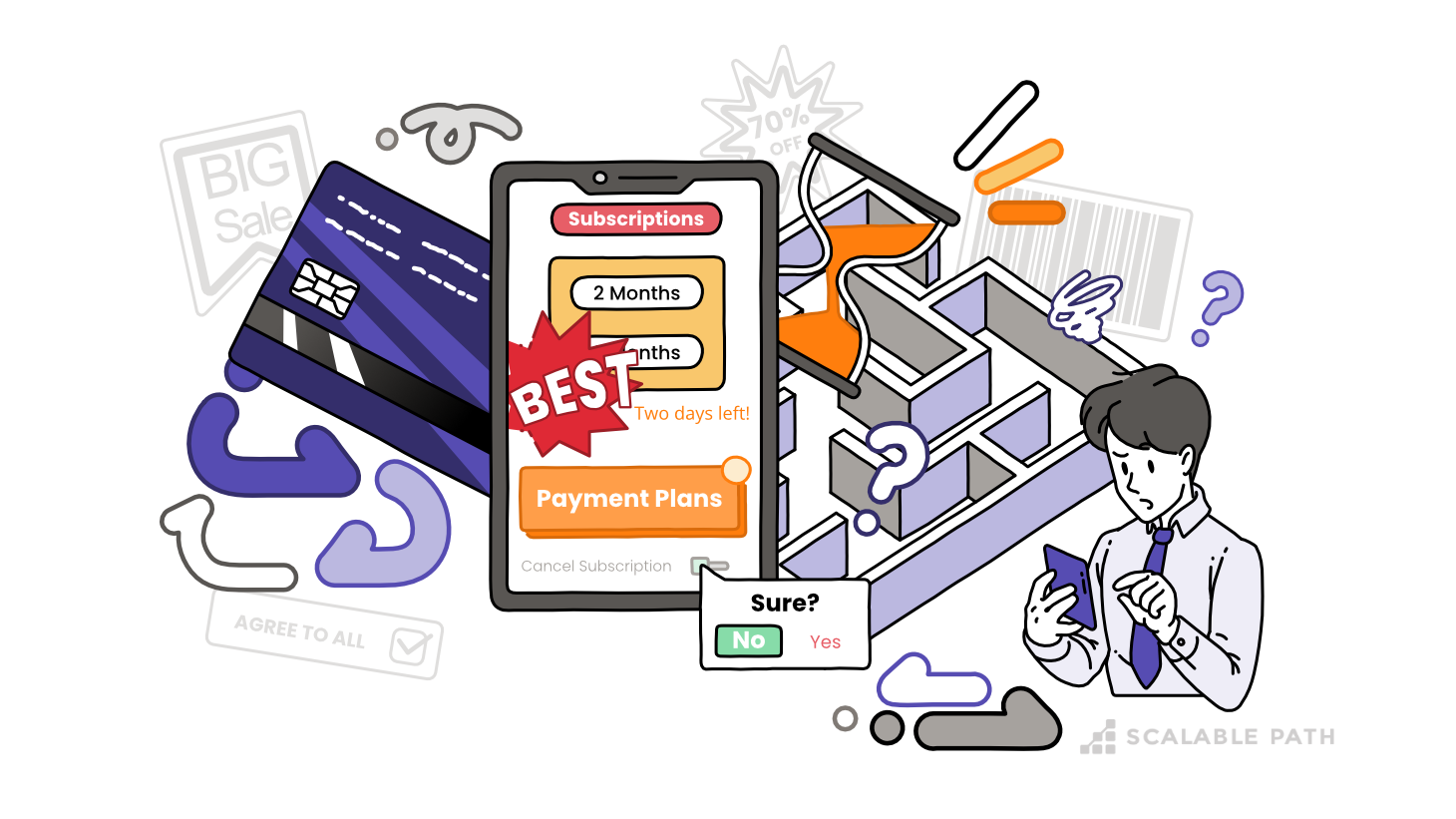
If you work in tech, you’ve likely heard of dark patterns. If you haven’t, you have almost certainly encountered them; maybe you’ve even unknowingly designed one.
A dark pattern is an intentional design choice that manipulates or misleads users. Businesses use them to boost key business metrics, like revenue or user growth. And they almost always come at the expense of the user.
Table Of Contents
- What are “Dark Patterns”?
- Common Types and Examples of Dark Patterns
- The Rise of Deceptive Design Tactics
- Today: Normalization of Dark Pattern in UX Design
- Persuasive Design or Manipulation? Navigating the Ethics of Dark Patterns
- How Can We Address Dark Patterns?
- Final Thoughts: Moving Beyond Dark Patterns
So how did we get to a place where designers, likely well-meaning, were building interfaces with the intention to mislead us? That made us purchase something we didn’t need (or even want)? That made us give up on canceling a subscription because it took so long to find the “cancel account” option?

These are questions we were curious about – not only to deepen our own understanding, but also to inform our own ethical design standards. In this article, we attempt to answer these questions: explore what dark patterns are, why they work, why businesses use them, and most importantly, how we as designers and developers can create better, more honest user experiences.
What are “Dark Patterns”?
Also called “deceptive designs,” dark patterns are deliberate design choices that ultimately steer users to act against their own best interests. These tactics benefit businesses by helping them increase some metric of interest to shareholders or investors.

Dark patterns work, in large part, by preying on our cognitive biases, emotional triggers, and above all, weaknesses in our decision-making processes. They exploit feelings like social guilt, fear of missing out (FOMO), and commitment bias. In the same way that slot machines capitalize on the rush we get from unpredictability, dark patterns are not simple gimmicks; they’re an orchestrated play on our minds.
Common Types and Examples of Dark Patterns
Part of why dark patterns can be hard to identify is that they come in dozens of forms, each with its own way of nudging users into actions they might not have chosen on their own. Let’s look at some of the most common types of dark patterns, along with examples you have likely encountered.

Roach Motel
The “Roach Motel” dark pattern draws its name from a popular insect trap of the ‘70s and ‘80s with the same name. It refers to any tactic or process that makes it easy to get in, but nearly impossible to get out.
Companies that use this approach typically offer a quick, seamless sign-up process, which ultimately encourages sign-ups. At the same time, they bury the exit path in a maze of barriers, making it incredibly difficult to cancel or unsubscribe.
Some of the common barriers you’ll see include:
- removing self-service options,
- limiting cancellation to certain hours by phone
Ultimately, the “roach motel” presents just enough friction to make many users give up. It’s also one of the most common dark patterns many of us encounter with subscription-based services.
Example: Prime Video Channel Add-Ons
Prime Video has tons of additional video “channels” you can subscribe to: Paramount Plus, STARZ, AMC+; in all, there are over 100 Prime Video add-ons. Shudder, the channel dedicated to niche horror movies, is one such channel.
Shudder, which comes in at $6.99/month, comes with a 30-day free trial. Signing up is easy, and a free month is a great deal, right?
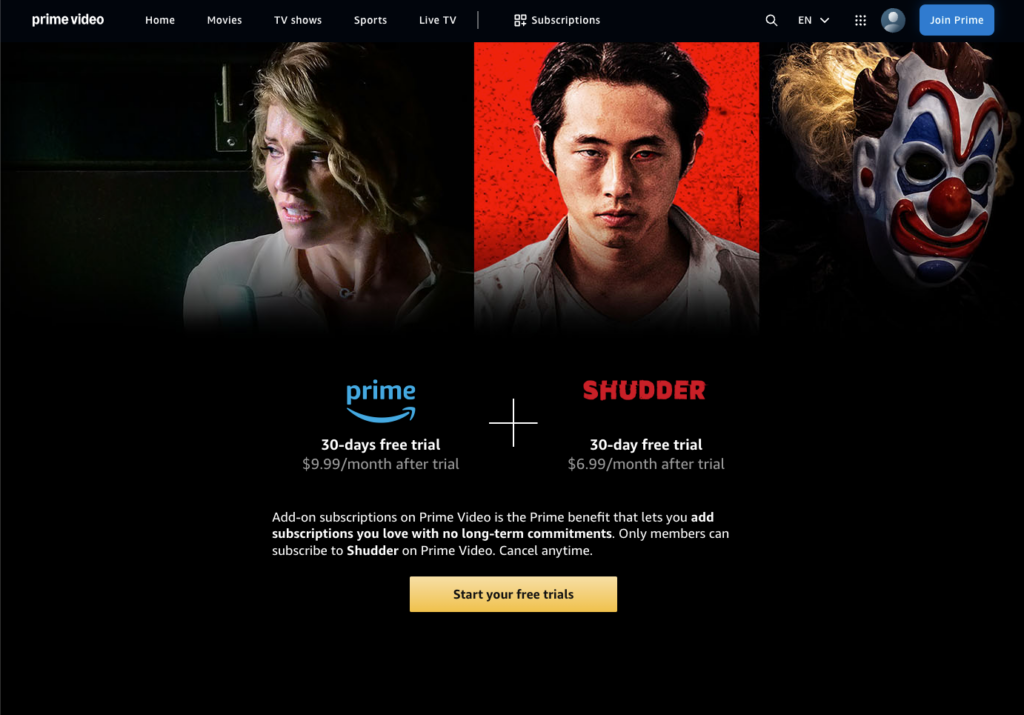
If you’re good at setting reminders for yourself to cancel subscriptions, then yes, it is a good deal. Amazon will not remind you that your free trial is reaching its end date. And canceling is not easy.
Let’s say you signed up on your Smart TV (which is more than likely). The process was easy: scan a QR code, enter a password on your mobile, and in under a minute you’re streaming horror films.
But canceling on your TV? Not an option.
Next, you might try canceling in the Prime Video mobile app (since your phone was also used to subscribe). But you’ll be disappointed. Even where it says “Manage Subscription,” all it does is show you … more videos you can watch?
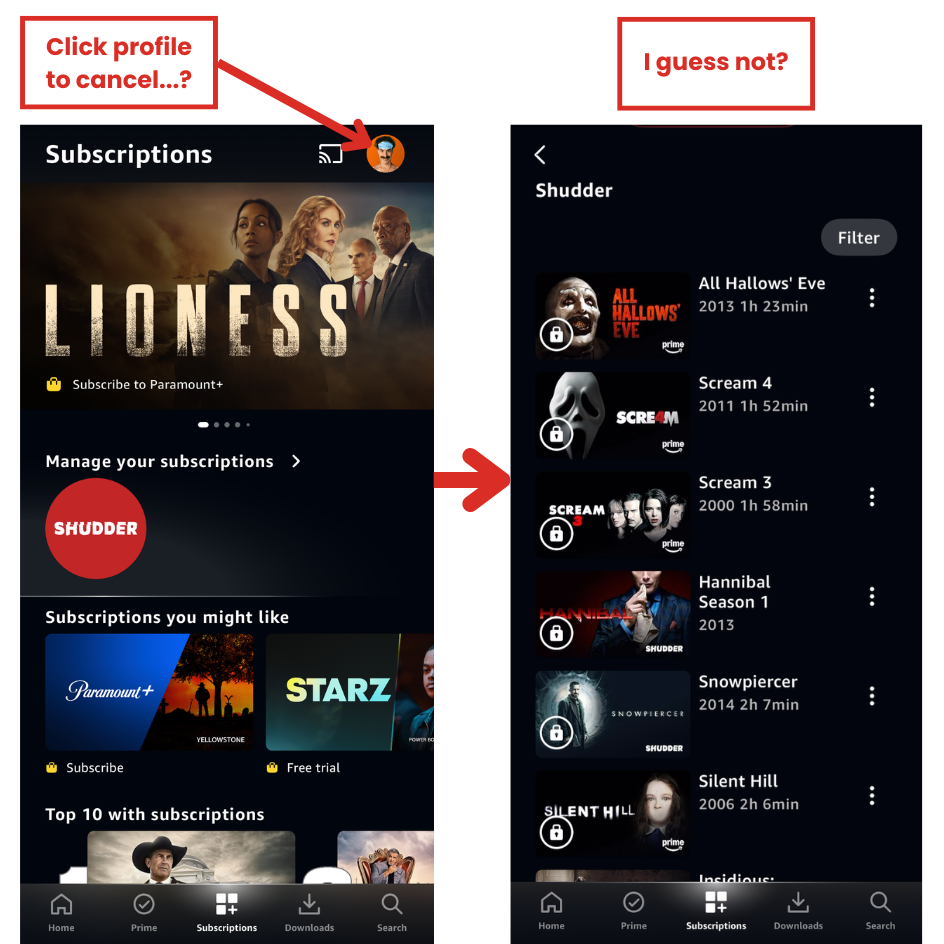
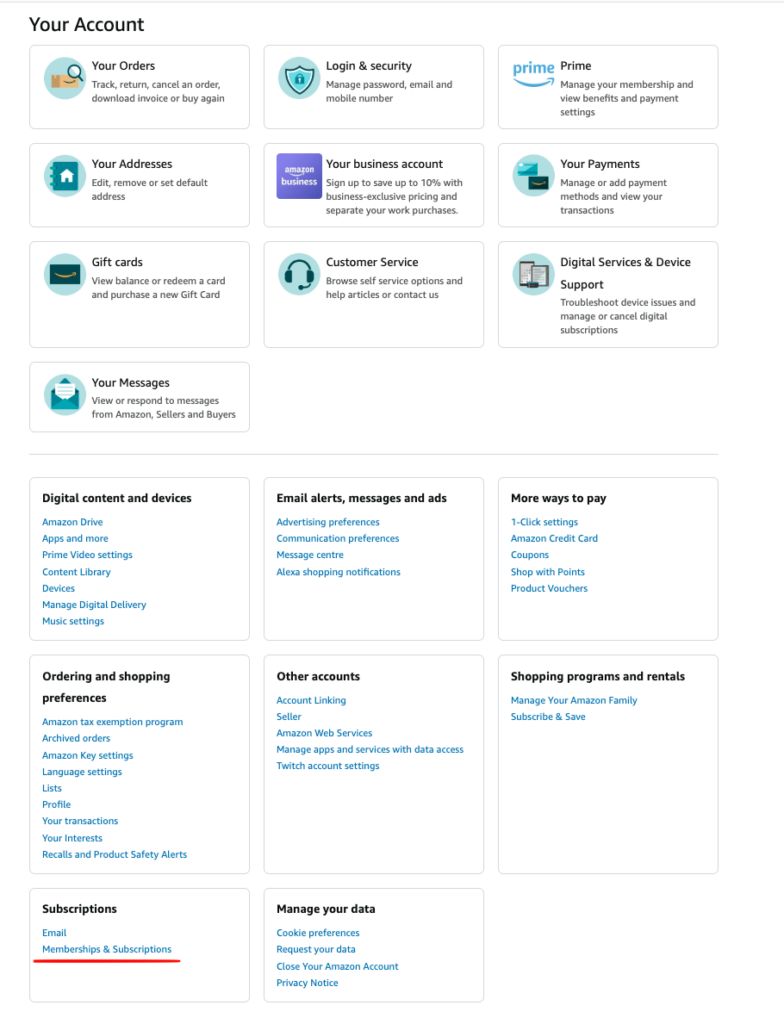
OK…next, maybe you try the Amazon mobile app. Sorry to be the one to tell you this, but you will be thwarted again: Amazon doesn’t offer a self-service option for any of the video add-ons on the mobile app.
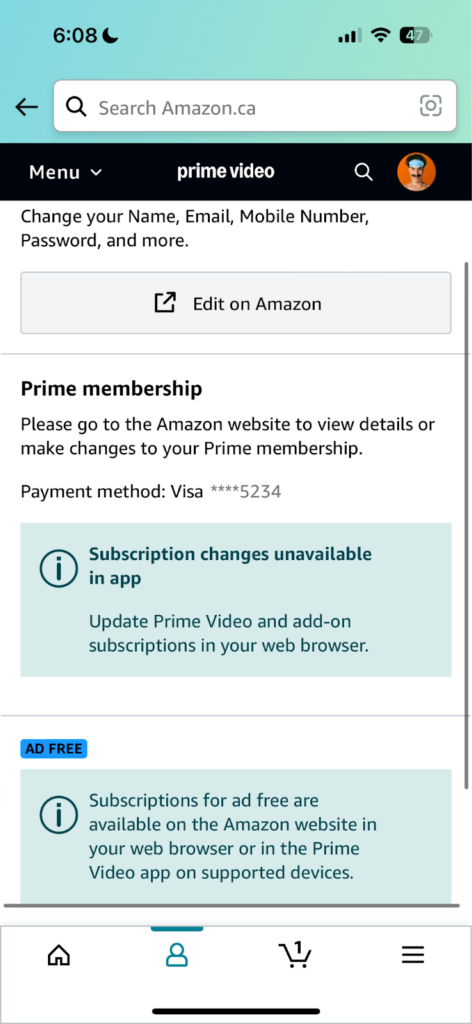
To actually cancel your subscription, you have to:
- Log in to Amazon (not Prime Video, and not the mobile Amazon app) on a web browser,
Sometimes, they will even direct users to call customer service for “special assistance.” This extreme amount of friction exhausts users, making many abandon their attempt to unsubscribe.
Forced Continuity
The “Forced Continuity” dark pattern sneaks subscription charges onto your credit card, often following a free trial. These services hook users with a “no-risk” trial that requires payment information upfront, but once the trial ends, they start charging without clear reminders.
Forced continuity is typically combined with roach motel tactics, wherein companies make canceling harder than expected, and surprise charges start rolling in before users have had a chance to opt-out.

Adobe Stock, A Prime Example of Forced Continuity
Adobe Stock is an add-on to Creative Cloud that gives you access to stock photos, videos, and images. When you sign up, you’ll get an initial free trial period of 30 days. And if you forget to cancel, it’s only $38.99/month – so, not horrible, right?
Not quite. Take a look at this screen:
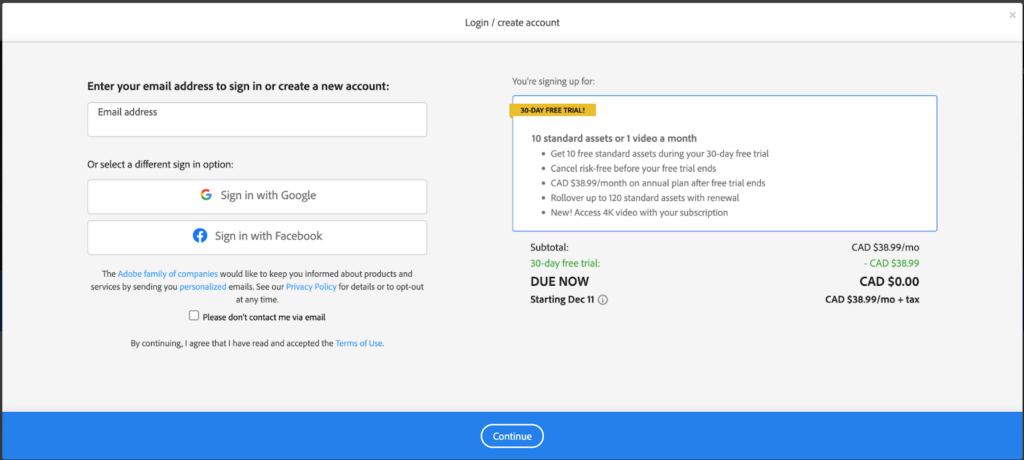
Do you notice that you’re actually signing up for an annual plan? If you don’t, that’s intentional: the only place it’s referenced on this screen is in tiny print in the sentence, “CAD $38.99/month on annual plan after free trial ends.”
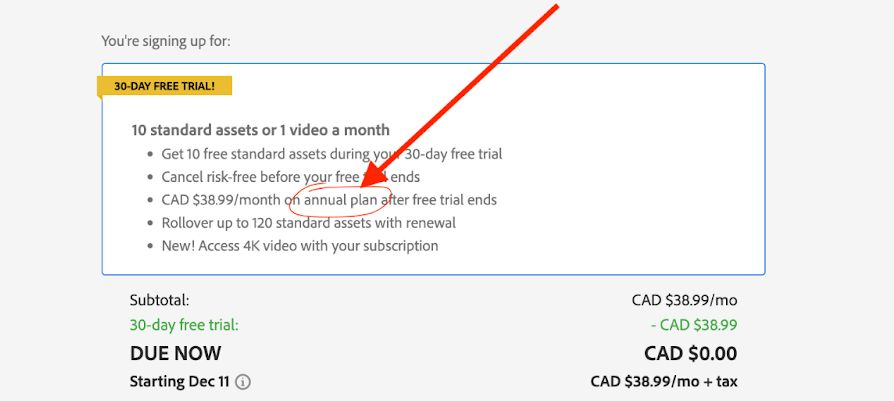
That means once your trial is over, Adobe will renew your subscription for a full year. In my case, I never even received a prior notification – the only email I received was two days after the annual renewal charge hit my credit card. No reminders, no heads-up.
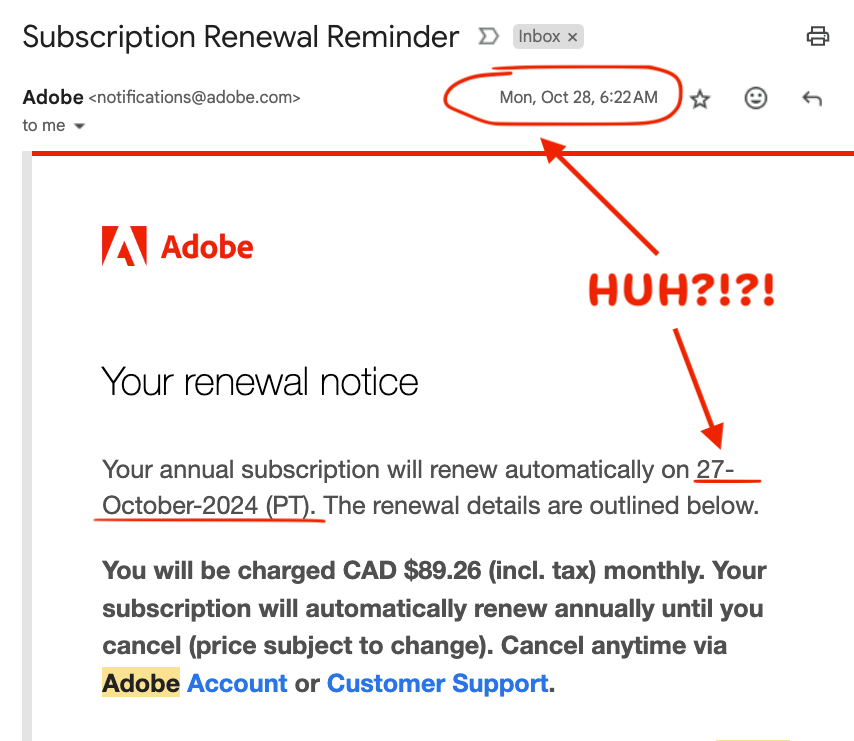
(The cherry on top is saying you can “cancel anytime.”)
And if you want a refund, forget it. You’ll have to pay for breaking your contract. But hey, maybe they’ll give you two months of the year free.
Hidden Costs
Hidden costs sneak in late in the checkout process, showing users a low upfront price only to reveal extra fees at the last minute. These added costs may include service fees, handling charges, or processing fees, catching users off-guard right before they complete a purchase.
Airlines and Booking Platforms
Airlines frequently advertise attractive base prices but then impose fees for services that travelers might assume are included. A 2023 article in USA Today showed just how much U.S. airlines were concealing costs. The worst offender, Spirit Airlines, actually had hidden costs that were 736% higher than the advertised flight cost.
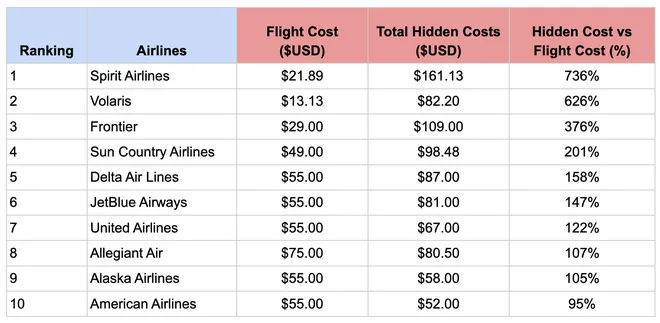
In the late 2000s, paying for checked bags became common practice with most airlines. Since that time, the number of hidden costs within the airline industry skyrocketed.
Along with a $30 to $50 fee for every checked bag, airlines now commonly charge for:
- Seat Selection: Choosing a standard seat could add $10 to $30 to your fare.
- Carry-On Baggage: Bringing an additional carry-on might incur a fee ranging from $20 to $40.
- Priority Boarding: Opting for early boarding may add another $15 to $25.
- In-Flight Amenities: snacks, beverages, or in-flight entertainment often come at an extra cost.
Disguised Ads
Disguised ads are ads masquerading as legitimate site content, tricking users into clicking on them. They might look like news articles, search results, or even download buttons, seamlessly blending in with the page’s main content to catch users off-guard.
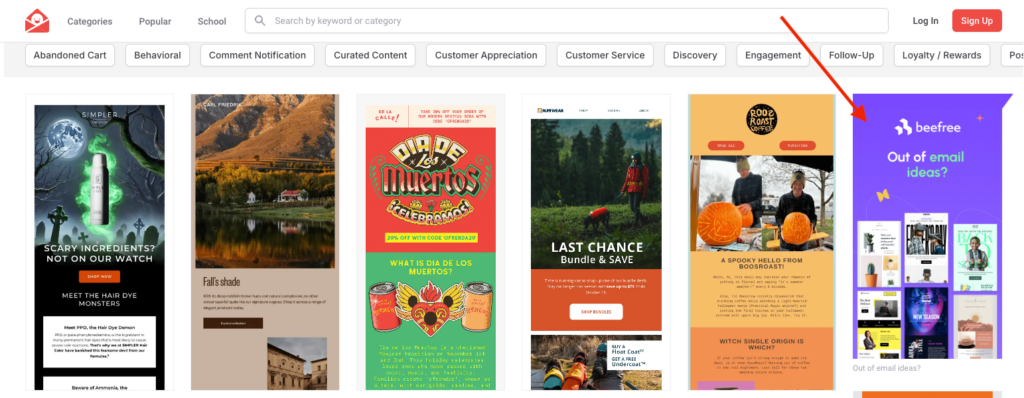
Two Examples: Dribble and Business Insider
Consider Dribbble, a go-to platform for designers to discover and showcase creative work. While browsing, you’ll see a mix of designs and recommended content. But some of these “suggestions” are actually paid promotions, subtly blended in with user-generated content:
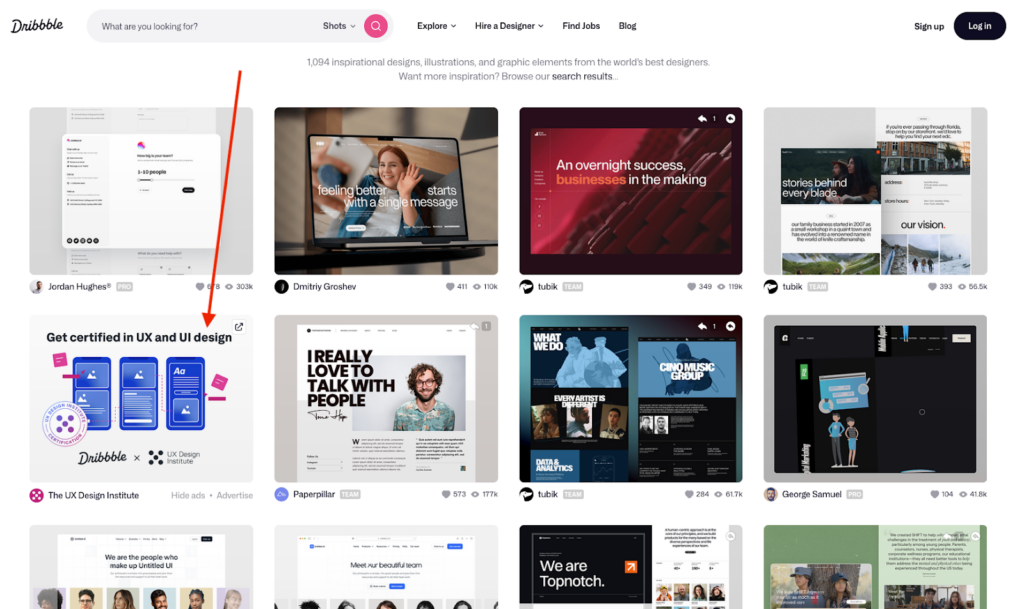
The only hint is a small “sponsored” label that’s easy to overlook.
Another, and perhaps more insidious, example is Business Insider (though they’re not the only online news site guilty of this tactic). Business Insider frequently integrates “partner content” on their news pages.
As you scroll through an article, you’ll find “related articles” or “more from around the web” sections that look like they’re part of Business Insider’s editorial content.
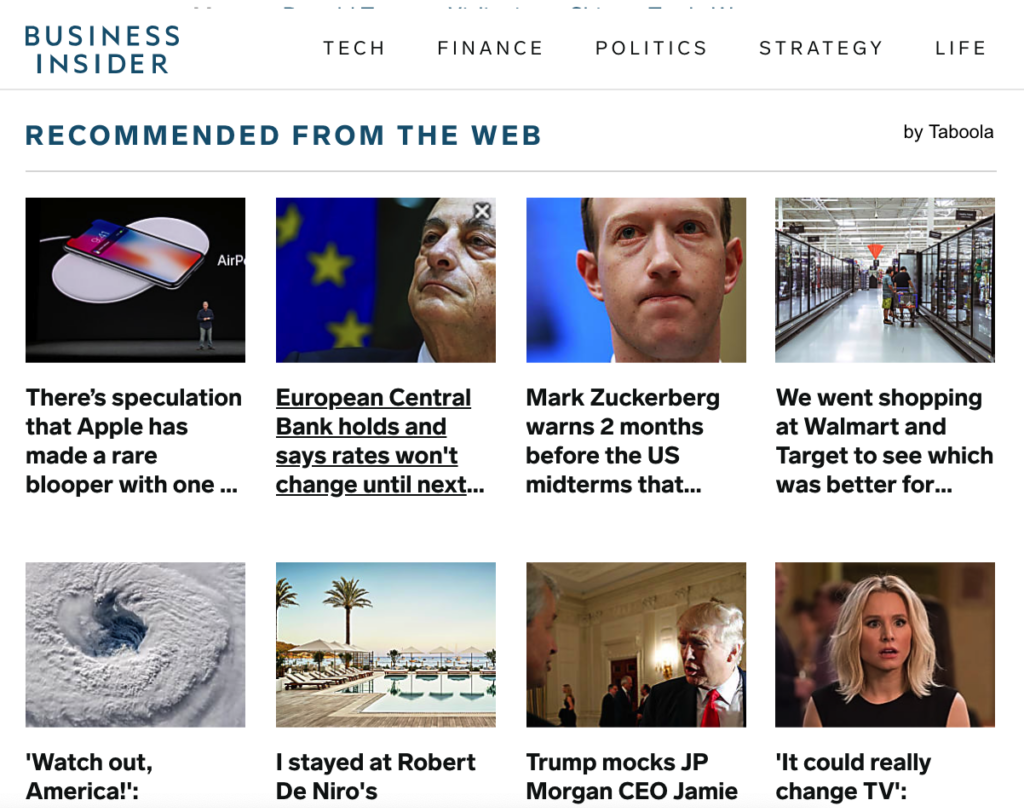
In reality, many of these are ads from external brands, made to appear like genuine Business Insider articles. Users often don’t realize these are paid partnerships designed to appear as unbiased content until they click through—and by then, the company has already profited from the ad impression.
Confirm-Shaming
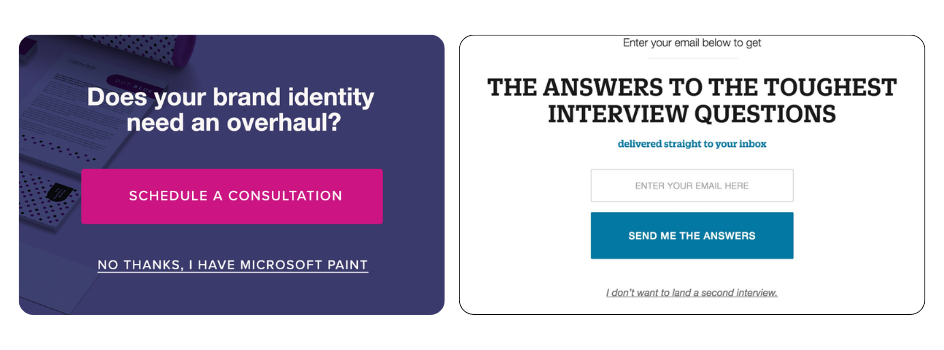
Confirm-shaming uses social pressure to make users feel guilty if they choose to opt out. You’ve likely seen this tactic in pop-ups: “No, I’d rather pay full price” or “No, I don’t want to save money.” By framing the “no” option this way, sites make users second-guess their choice, hoping they’ll feel pressured to stay.
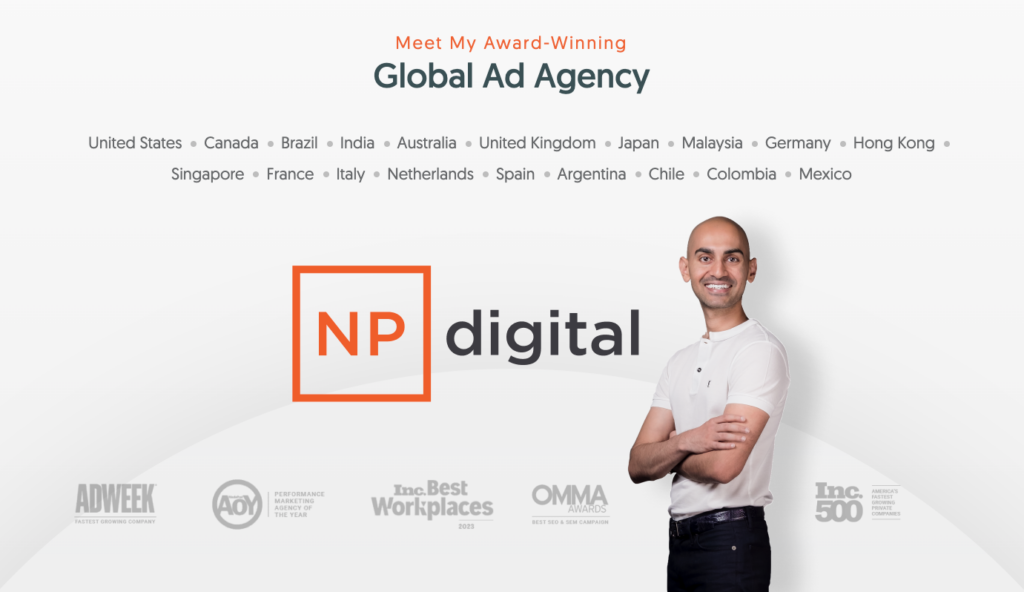
Neil Patel, the Original Confirm-Shamer
Take Neil Patel’s website, for example (which is full of deceptive design). This fact on its own gives me pause – namely because Neil Patel is referred to as “one of the world’s best marketers.”
I’ll be honest, I have little respect for this approach. The ‘never-fail marketing formulas’ Neil Patel presents are ones that, if not outright unethical, consistently push the boundaries of what feels fair or honest. These tactics might drive short-term results, but they erode trust in the long run.
The website makes regular use of exit intent popups, prompts, and gated content to encourage you to give away your email and other personal details. When you’re presented with one of these pop-ups, you’ll see an enthusiastic message like, “Yes, I want to improve my traffic!” in bold, appealing text. But if you’re not interested? The “no” option reads something like: “No, I prefer to stay where I’m at” or “No, I don’t care about growing my business.”
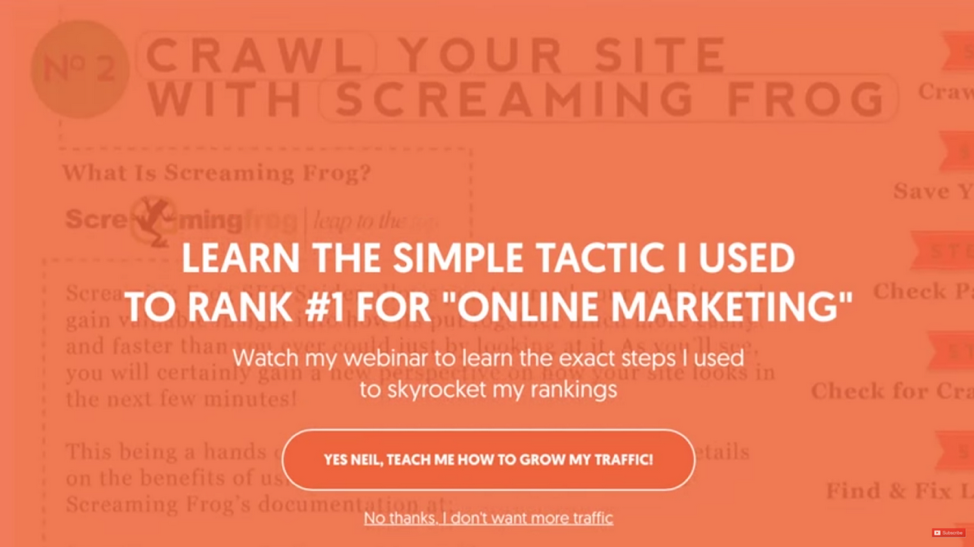
The “no” option subtly implis that not signing up is a poor choice. It’s a clever play on social and cognitive biases: confirm-shaming makes users question their choice and second-guess themselves, creating a higher likelihood they’ll comply just to avoid feeling foolish.
Scarcity and Urgency Tactics
Creating a false sense of scarcity or urgency pushes users to act quickly, often without careful thought. Messages like “Only 1 left in stock!” or “Sale ends in 10 minutes!” rush users into making purchases by tapping into FOMO (fear of missing out). Often, these alerts are misleading, designed to pressure users without reflecting actual stock or sale timelines.
Example: Temu, E-Commerce Giant That Loves Scarcity & Urgency Tactics
Temu, a rapidly growing e-commerce platform, employs these tactics extensively. While browsing products, you might encounter messages like “Only 3 left!!!” Or you’ll get a “spin the wheel” to get a free item (spoiler: you always get the free item). But when you spin it, one of two things happen:
- You have to make a purchase before you unlock the free item.
- You have to make the purchase in 10 minutes or you lose the gift.
These alerts are designed to create a sense of urgency, prompting immediate purchases out of fear that the opportunity will vanish.
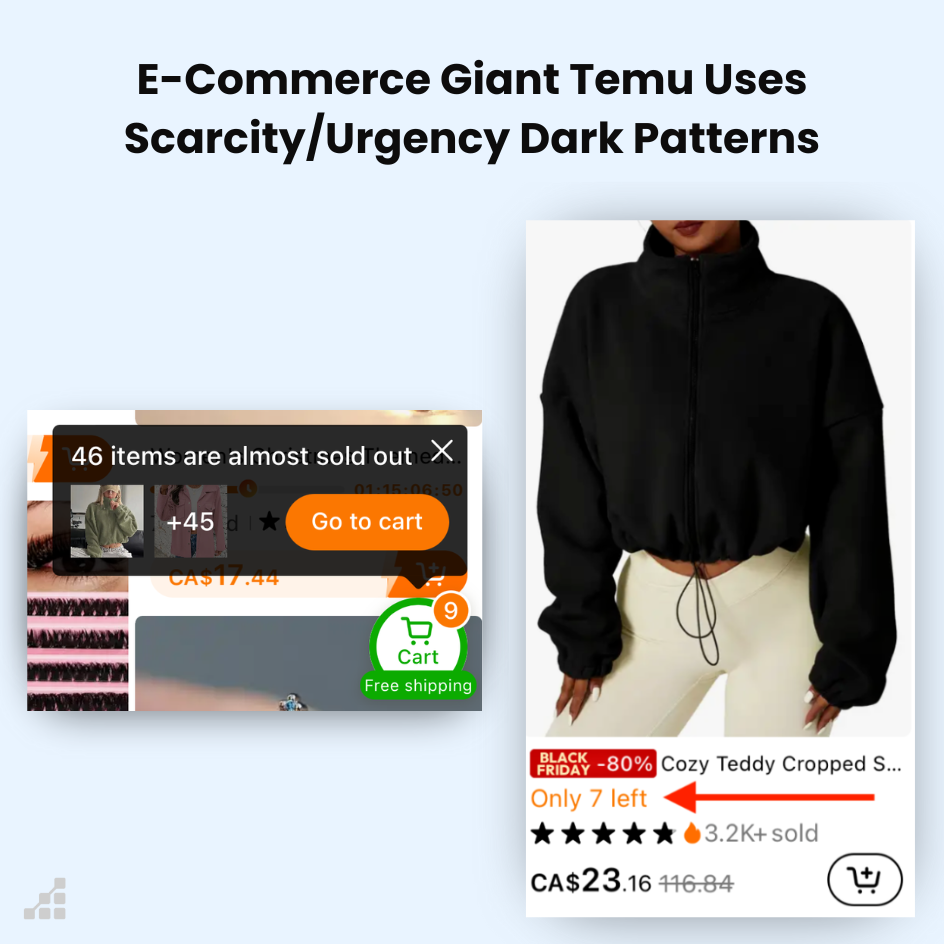
However, these scarcity cues are often illusions. For instance, a patterned pair of socks priced at $1.99 might display a warning of limited stock, yet the same item remains available at a slightly different price or name. Same with the use of their “urgency tactics”: they use countdown timers and clocks to make it feel like you have to buy a product now or miss out on a limited-time deal:

Misdirection
Misdirection highlights certain elements to divert attention from others. A common example is a software subscription that makes its paid offering larger than free ones, use colorful buttons, or ribbons stating “best value!” At the same time, free or cheaper alternatives appear in small, faintly-colored links. The goal is to direct users’ attention toward higher-cost options without entirely hiding other choices.
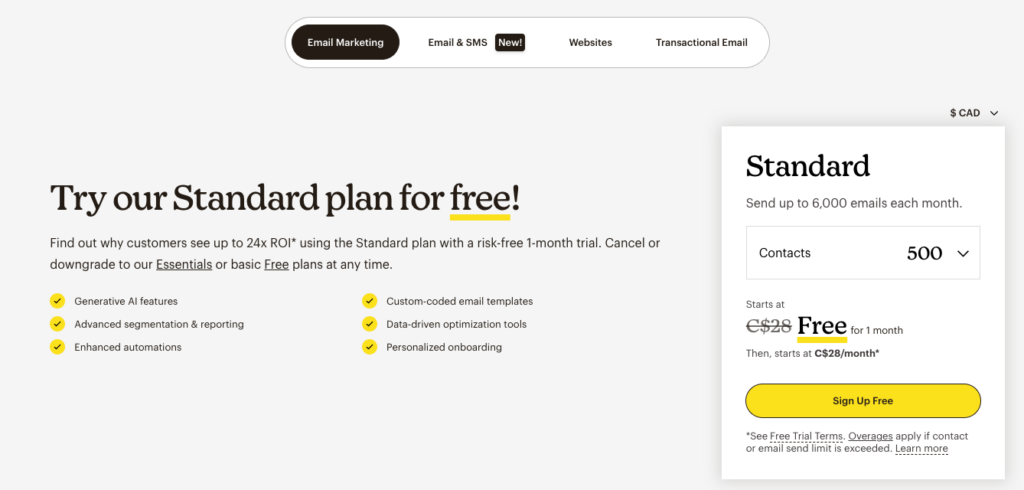
Mailchimp: Using Misdirection to Push You To Paid Plans
Mailchimp’s pricing page exemplifies this tactic. When users visit the page, the “Standard” plan is prominently highlighted with labels like “Best Value” or “Recommended,” drawing immediate attention. They even go so far as to label the paid plan as Free prominently, with fine print informing you it’s not actually free.
In fact, you can’t even see the free options until you scroll down past the initially viewable part of the screen:
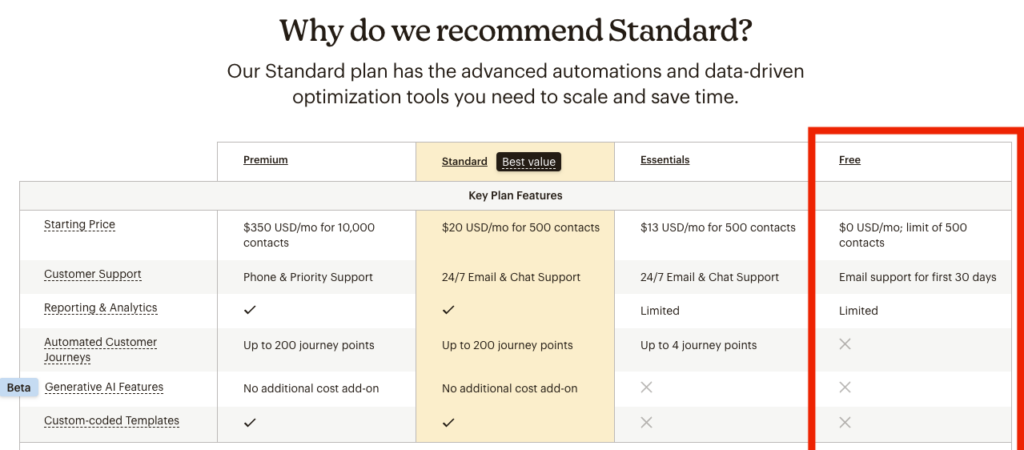
But MailChimp doesn’t just downplay the free plan; they also show you a plan that looks far more expensive with functionality that doesn’t really make a meaningful difference in daily utility:
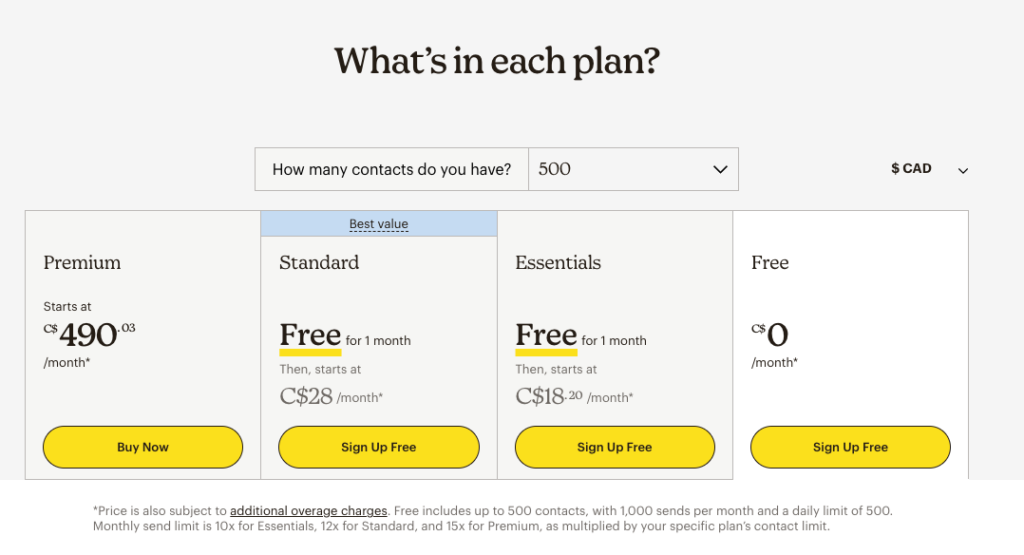
This visual emphasis suggests that “Standard” is the optimal choice for most users. In contrast, the “Free” Plan (and to a lesser extent, the “Essentials” plan) are presented with less prominence, using smaller fonts and subdued colors, making them less noticeable. Even the Premium (at $490/month!) is shown with almost as little prominence as free.
The Rise of Deceptive Design Tactics
To be clear, I don’t believe that the majority of marketers, developers and designers are acting maliciously. Dark patterns are often presented as “effective marketing strategies” or “proven methods to increase conversions.” They’ve become standard fare in marketing courses and UX best practices. But their impact is clear: they rely on dishonesty, misleading manipulation, and user experiences designed to benefit businesses at the expense of users.
Prioritization of Recurring Payments and Predictable Revenue Streams
As e-commerce and subscription models exploded in the late 1990s and early 2000s, businesses prioritized predictable revenue streams and recurring payments. Metrics like Annual Recurring Revenue (ARR) and Monthly Recurring Revenue (MRR) became benchmarks for success. To meet these goals, companies turned to tactics like the “Roach Motel” and “Forced Continuity” to lock users into subscriptions and make cancellations unnecessarily difficult.
Behavioral Psychology and Data-Driven Exploitation
At the same time, advances in behavioral psychology gave companies the tools to influence users through cognitive biases like FOMO and commitment bias. Detailed user tracking and A/B testing validated deceptive tweaks—such as countdown timers or confirm-shaming—proven to boost conversions, often at the cost of user trust. These methods were quickly labeled as “best practices” because they worked, normalizing manipulation as an acceptable strategy.
The Influence of the Attention Economy
In the 2010s, social media platforms like Facebook and Instagram tied revenue to user engagement, introducing monetization models that encouraged longer time spent on-site. To achieve this, platforms blended ads into content, exploited users’ attention, and created addictive experiences. The focus shifted from serving users to maximizing their time and spending, often leaving users feeling misled or manipulated.
Investor Pressure and Short-Term Gains
Investor-driven demand for rapid growth after the 2008 financial crisis reinforced these tactics. Companies prioritized short-term metrics like sign-ups, clicks, and retention, often at the cost of user trust. Manipulative design became not just common but expected, as businesses sought to meet investor expectations for predictable, recurring revenue.
Today: Normalization of Dark Pattern in UX Design
Dark patterns have become so ingrained in digital experiences that they’re nearly invisible to most users. Large platforms like Amazon, Google, and Facebook leveraged these tactics to drive growth and engagement, pressuring competitors to follow suit.
Over time, this widespread adoption blurred the line between manipulative design and industry standards, making dark patterns seem like just another way to boost conversions and retention.
Now, dark patterns are so pervasive that users hardly notice them as “patterns” at all. In 2019, a study of 53,000 product pages on 11,000 online stores found that 11% of e-commerce sites employed dark patterns, particularly on popular, high-traffic sites. By 2022, an EU Report revealed that 97% of the most popular websites and apps used by EU consumers contained at least one dark pattern.
As these tactics became normalized, users stopped questioning whether an experience was ethical or simply “how things are.” The result is a digital landscape where manipulation feels standard, leaving trust as the ultimate casualty.
Persuasive Design or Manipulation? Navigating the Ethics of Dark Patterns
As dark patterns have become normalized, it’s harder than ever to distinguish between persuasive design and outright manipulation. While ethical design principles like transparency, autonomy, and fairness offer guidance, the reality is more complicated.
The Challenge of Accountability
Defining and maintaining ethical design practices raises a difficult question: Who is ultimately responsible for upholding them? Marketers and designers may face pressures from management to hit specific KPIs, and managers, in turn, might be driven by shareholder demands for growth.
In many cases, dark patterns aren’t seen as ethical dilemmas but as effective solutions to meet metrics, making it difficult for any one person or team to make a stand.
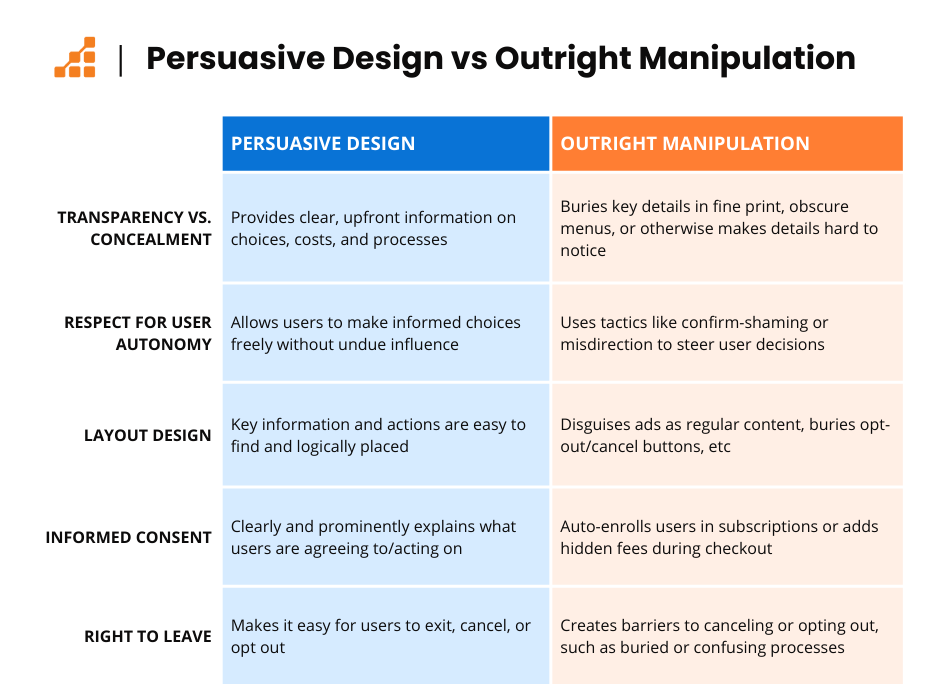
Persuasive Design vs Outright Manipulation: How to Tell The Difference
There is no magic bullet to determine whether something is a dark pattern or simply persuasive. But there are some questions we can ask ourselves when we design interfaces that help shed light on the choices we make.
Is it Transparent, or is Information Being Concealed?
Transparency in design means providing users with clear, upfront information on choices, costs, and processes. Concealment doesn’t always mean hiding information entirely—it can also involve presenting it in ways that make it difficult to notice or understand. For example, important details may be buried in fine print, placed in obscure menus, or shown with low contrast that users are likely to overlook.
While transparency respects user understanding and decision-making, these subtle forms of concealment prioritize short-term gains at the user’s expense, eroding trust in the long run.
Does it Respect User Autonomy?
Autonomy in design respects a user’s right to make informed choices freely, without undue influence. Manipulative designs use pressure tactics—like confirm-shaming or highlighting more expensive options—to steer users toward certain decisions. True autonomy means giving users options without unnecessary nudges, allowing them to choose what’s best for them.
Clear vs. Deceptive Layouts
Clear layouts guide users logically and with honesty. They make it easy to find key information and actions. Deceptive layouts, however, might disguise ads as regular content or bury “no thanks” buttons to drive engagement. Clear design fosters trust, while deceptive layouts prioritize engagement metrics.
Informed Consent vs. Uninformed Actions
Ethical design seeks informed consent, giving users full knowledge of what they’re agreeing to. This means no auto-enrolling users in subscriptions or adding hidden fees during checkout. Instead, users should have full visibility into actions affecting their experience and finances. Uninformed actions, by contrast, prioritize short-term profits at the cost of transparency.
Respecting Users’ Right to Leave
One of the clearest ethical lines is respecting a user’s right to leave. Allowing easy cancellation or exit, without hidden hurdles, demonstrates genuine respect for user autonomy. When companies intentionally create barriers to canceling a paid subscription—whether through buried options, confusing processes, or limited access—it verges on exploitation, if not outright theft. These tactics prioritize retention rates at the expense of users, even when those users no longer find value in the service.
One of the clearest lines is respect for the user’s right to leave. Allowing easy cancellation or exit, without hidden hurdles, demonstrates genuine respect for user autonomy. Companies that create cancellation barriers sacrifice this respect in favor of retention rates, even if users no longer find value in their
How Can We Address Dark Patterns?
Disclaimer: I don’t have a magic bullet. I wish there was an answer other than “stop focusing on growth at all costs.” Addressing dark patterns requires action from multiple fronts: regulation, companies, and consumers. I can’t pretend like these are easy shifts, or even realistic ones.

Regulation
Governments are beginning to step in, recognizing the harm caused by dark patterns. But it’s slow. Regulation of private industry is hampered by policy, fears of losing our companies to other countries, and the power that these multi-trillion dollar companies hold.
But there are some strides in the regulatory space. New legislation, like California’s recent privacy law, aims to curb manipulative practices, though it’s facing pushback from businesses. As regulation gains traction, we may see clearer standards that protect user autonomy and transparency.
Companies
Companies can lead by committing to ethical design. Designing with transparency and user trust in mind can become a competitive advantage, helping brands stand out in crowded markets. Shifting focus from metrics like click-through rates (CTR) and “time on site” to retention, loyalty, and customer satisfaction can foster long-term trust and lasting relationships with users.
While this might sound laughable (what company would choose to stop following industry norms and risk eating into their profits) there is some reason to believe it could happen. Gen Z represents more of the purchasing population every year, and they value trust, authenticity, and genuine relationships. Because they’ve grown up in the digital world, they may be more adept at spotting dark patterns and blackballing companies that use them.
Consumers
I try to avoid placing the burden of responsibility on consumers. Expecting users to recognize and navigate dark patterns shifts the focus away from the companies creating them. It’s like asking individuals to advocate for their own healthcare in a broken system, find healthy food in a food desert, or prioritize exercise while working multiple jobs. The systemic issues at play make it unfair to expect individuals to bear the full weight of solving them.
But dark patterns will not go away overnight. So it is in our best interest to learn to recognize common dark patterns. We can question urgency messages and set reminders for free trials. We can regularly review subscriptions and read reviews before signing up can help identify hidden fees or cancellation issues.
Final Thoughts: Moving Beyond Dark Patterns
Dark patterns are a powerful reminder of how design choices can impact people’s lives in ways both subtle and significant. As these tactics become industry norms, it’s easy to forget that every interaction we shape affects users’ trust, autonomy, and even mental well-being. Moving away from dark patterns won’t be a simple fix—it requires a shift in how companies view growth and success, a commitment to transparency, and, ultimately, a dedication to respecting our users as individuals with agency.
For designers, developers, and businesses, the path forward is about more than just metrics and conversions. It’s about redefining what success looks like: focusing on long-term relationships over short-term wins, valuing trust over engagement, and designing experiences that empower rather than exploit. As Gen Z and future generations demand more authenticity, the companies that lead with integrity and fairness will likely stand out in ways that truly matter.
In the end, the goal isn’t perfection but progress. If we can become more mindful of the impact of our designs—and if users, regulators, and companies work together to uphold these values—there’s hope for a digital world where ethical design is the standard, not the exception.