
Livewire vs Inertia: Which one Should I Choose for Laravel Development?

Laravel is one of the most widely-used PHP frameworks today. A quick Google search will surface a plethora of tools that exist within this framework’s ecosystem, and it’s easy to understand why it’s become a go-to choice for various types of projects. Whether it’s being used to create an API, a command-line tool, or a full-stack app, Laravel enables developers to reliably build robust and scalable applications.
Table Of Contents
The framework is flexible enough to allow you to do virtually anything you want with the front-end: you can use React, Livewire, jQuery, or any other tool. But there are two tools in particular that are changing the way Laravel and PHP Developers are approaching front-end development: Laravel Livewire and Inertia.js.
In this article, we’ll dive into these tools. First, we’ll discuss the problems they were created to solve, key differences between them, and how they are helping developers navigate front-end challenges more easily.
Livewire or Inertia, Which One Should You Choose?
The question that opens this section of the text is entirely valid. However, before we discuss each option and understand which is the best choice for you, your project, and your team, it’s necessary to clarify a very important point: Inertia and Livewire are categorically different tools. While they do attempt to solve the same problem, they take essentially different approaches. Let me explain.
The Roles of Inertia and Livewire in a Web Application
Before we talk more about this topic, it’s important to understand the role that Livewire and Inertia play in a web application.
Both Inertia and Livewire make it easier to build SPAs (Single Page Applications). In case you are not so familiar or need a refresher, an SPA is a web application that dynamically rewrites the current web page with new data from the web server in response to user actions. This means that, instead of loading entire pages from the server each time the user requests a new page, an SPA only loads the necessary data and rewrites the current page the user is viewing. This results in a more fluid and faster experience.
The challenge with this approach is that it involves a significant amount of hard work, including writing a lot of boilerplate code to ensure the front-end and back-end communicate effectively with each other. That includes routes, security, and many other details.

This is precisely where Livewire and inertia.js come into play. They emerged with the purpose of simplifying the process of creating dynamic applications.
Comparing Apples to Apples
As you can see, Livewire shouldn’t be directly compared to Inertia.js, but with React or Vue, for example. That’s because Inertia is not a framework, but a JSON protocol specification that allows back-ends (not just Laravel) to communicate more easily with React, Vue, or Svelte applications.
Let’s return to our starting question: which one should you choose? Even though you can’t compare Inertia and Livewire directly, the choice you make will dictate very different directions for the front-end of your application.
Livewire and Inertia are Considered “First-Class Citizens” of the Laravel Ecosystem
Both Inertia and Livewire are considered first-class citizens of the Laravel ecosystem (they are recommended by Laravel’s official documentation). Both tools have high public adoption, are well-tested, and are well-written.
When starting a new application with Laravel, you have the option to choose between Livewire and Inertia as your technology foundation. Both are considered reliable choices, offering robust paths for your project. Ultimately, the decision between them will hinge on factors other than support or community, as both technologies are well-defined in these aspects.
Overview of Laravel Livewire
Livewire was specifically designed to integrate with Laravel, catering particularly to back-end developers who may have less experience with front-end technologies. It’s an ideal choice for those who don’t want to engage in the complexities of using frameworks like React or Vue, but still wish to incorporate dynamic elements into their applications.
Livewire helps the developer create dynamic applications without having to write a single line of Javascript. Instead, the focus of development is almost entirely on the back-end and PHP.
How Livewire Works
Before we go deeper into how Livewire works, let me quickly show you an example of a component created with this tool. I will not focus on the code itself, but I think it’s interesting for you to see an example to understand better how the magic happens.
The code below was taken from the tool’s documentation:
PHP Component:
1<?php23namespace App\Livewire;45use Livewire\Component;67class Counter extends Component8{9 public $count = 1;1011 public function increment()12 {13 $this->count++;14 }1516 public function decrement()17 {18 $this->count--;19 }2021 public function render()22 {23 return view('livewire.counter');24 }25}26
View:
1<div>2 <h1>{{ $count }}</h1>34 <button wire:click="increment">+</button>56 <button wire:click="decrement">-</button>7</div>8
As you can see, there is no visible JavaScript code on the main parts of this component. One is purely PHP, and the other one is Blade (Laravel’s template engine).
Just because there’s no visible JavaScript, however, it’s still there. When installing Livewire, you must include two special directives in your main layout file: @livewireStyles and @livewireScripts. These directives will render the necessary style and javascript code to make the “magic” happen.
How does it do this? Livewire acts as a bridge that connects the client (user’s browser) to the server (server where your application is running).
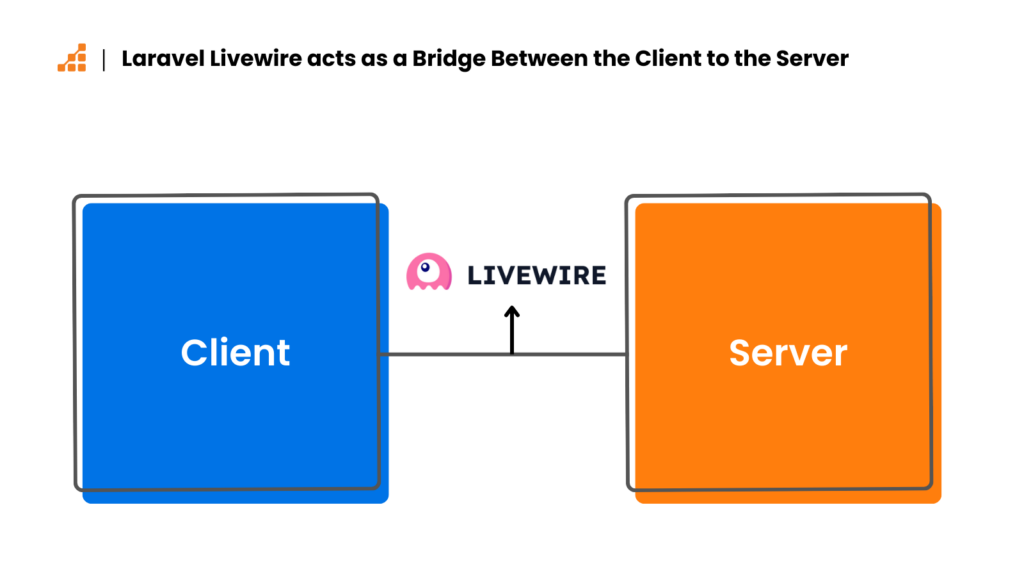
After the initial rendering of the page containing the Livewire component, the tool starts to have some listeners attuned to each action you defined in your front-end code.
When an action is detected, an asynchronous call is made as if it were an API. This call includes important data such as the state of the component and which action is intended to be triggered.
Then, the server is responsible for understanding this request and executing, on the server side, any function that has been called.
In the code snippet above, clicking on the button with a plus symbol sends a request to the server, which executes the increment function, and returns to the client.

What does this return look like? The return is nothing more than the Blade template that the component uses. Livewire is smart enough to only re-render what has actually changed, without needing to reload the entire page. That is what gives the impression of being something magical, because the user experience is as fluid as an SPA – but no JavaScript had to be written for this behavior to work.
Livewire is much more powerful than this example. I recommend reading its excellent documentation to get an idea of everything you can do with this tool.
Think of Livewire as a Framework
In summary, Livewire is a framework that will help you to achieve the creation of dynamic interfaces without ever writing a single line of Javascript. I like to call it the back-end programmer’s comfort zone. If you or your team is more back-end-oriented, this is not the only reason that will make you decide between Livewire and Inertia, but it certainly counts as a weight in the balance for the decision.
But let’s not get ahead of ourselves, let’s first also see more details about the other option!
Overview of Inertia.js
To start this section, I will put here a quote from Inertia.js’s own documentation:
Inertia empowers you to build a modern, JavaScript-based single-page application without the tiresome complexity.
As I explained before, Inertia.js has a very similar goal to Livewire but with a different approach. Basically, you can build applications that are 100% rendered on the client side, without the usual complexity this brings. With Inertia, there’s no need for client-side routing, nor even the development of APIs for communication with the front-end. You just create your controllers and views as an MVC standard and you will be able to use React, Vue, or Svelte in this scenario. Again, it seems a bit like magic, doesn’t it? But let’s see in more detail!
I briefly mentioned this at the beginning of this text, but it never hurts to remember that Inertia is not a framework. Inertia was built to be the glue between your back-end and front-end framework.
And yes, if you are wondering if Inertia works with other back-end technologies besides Laravel, it does! You can use it with Rails, Django, Go, and Node.js, to name just a few. For a full list of adapters, please check this link.
How Inertia.js Works
The main role of Inertia.js is to replace your application’s view layer. Instead of using traditional server-side rendering, the views returned by your application are JavaScript components. This allows you to use front-end frameworks like React, Vue, or Svelte while still utilizing your back-end framework routes, controllers, middleware, and authentication as you normally would.
Inertia.js is, at its core, a client-side routing library. You can visit pages of your application without actually having to reload those pages, making it an SPA without the workload of defining every route, authentication, and other requirements on the front-end.

Inertia has a <Link> component, which is a lightweight wrapper around a regular anchor tag that intercepts the default behavior and instead makes an XHR request. When this happens, the server detects it’s an action coming from Inertia and instead of answering with the regular HTML, it actually sends a JSON response so Inertia can do its magic and swap the components. This process ultimately results in a single-page application experience, using your own controller to pass data to the component.
Let’s take a quick look at a simple component using Inertia.js. Remember, I am skipping all the installation and configuration instructions. If you want to try this for yourself, please refer to the Inertia.js docs.
Laravel Controller:
1<?php23namespace App\Http\Controllers;45use Inertia\Inertia;67class PostController extends Controller8{9 public function show()10 {11 return Inertia::render('Post', [12 'title' => 'Hello from Laravel & Inertia.js!',13 'author' => 'Guilherme Assemany',14 'body' => 'Lorem ipsum dolor sit amet, consectetur adipisicing elit, sed...',15 ]);16 }17}18
If you are familiar with Laravel, you’ll quickly notice that there is something different about the return. We’re using Inertia to return the component name and data (props) to it. In this example, we are returning “Post” as the component name, and the props are title, author, and body.
On the front-end, we should decide the framework we want and create a component with the same name and simply read the props passed to it by the controller. In this example, I will use React, but there are official adapters for Vue and Svelte as well.
1import React from 'react';23const Post = (props) => {4 return (5 <div>6 <h1>{props.message}</h1>7 <p>{props.author}</p>8 <p>{props.body}</p>9 </div>10 );11};1213export default Post;14
Think of Inertia as a Bridge
As you can see, Inertia has simplified the process of connecting the back-end to your front-end; it wasn’t necessary to create an API, front-end routes, authentication, or anything of the sort. Just a simple front-end component to be rendered by the controller.
Unlike Livewire, Inertia.js is simply a protocol for connecting the back-end and front-end of your application, and therefore, it requires specific front-end knowledge, whether it’s React, Vue, or Svelte. It’s with these technologies that you and your team will write the front-end of the project. You don’t need to know much about Inertia beyond how it works, but you will need to have mastery of some front-end framework to develop the front-end.

If you are interested in taking a deep dive into the intricacies of how it works, I highly recommend reading Inertia’s protocol.
Considerations for Choosing Between Laravel Livewire and Inertia.js
Team or Individual Front-End Framework Preference
This is the main point to consider when deciding whether to go with Livewire or Inertia. It’s likely that the one you choose will be based primarily on preference and familiarity.
The main question here is in which direction you want to take the front-end of your application. Are you or your team comfortable using modern front-end frameworks? Or are you more focused on back-end development and don’t want to compromise on delivering a good user experience?
If you have a profile more oriented towards back-end development, you will definitely feel more comfortable using Livewire.
However, if your team includes people who are already familiar with front-end frameworks like React, Vue, or Angular, then Inertia.js may be the better choice. Inertia allows you to seamlessly integrate these frameworks into your front-end, leveraging the team’s existing skills and preferences to create a more dynamic and responsive user interface.
Development Speed and Productivity
Both Livewire and Inertia increase development speed and productivity. They also both act as effective facilitators for reducing the complexity that accompanies building dynamic front-end applications, though in their own way.
The difference, though, is that one of them is focused on PHP (Livewire), and the other is merely a bridge, requiring knowledge of front-end frameworks (Inertia).
I would say that in these aspects, both technologies are equal, with the major difference being who will use them and the user’s expertise.
For me, this point is a tie.
Considerations About Performance
React, Vue, and Svelte are battle-tested frameworks known to handle large applications without losing performance. Inertia.js simply provides an easier way to integrate them into your back-end. Livewire, on the other hand, relies totally on asynchronous requests to inform the server about the actions it needs to take to re-render the view. Generally, it works smoothly and shouldn’t be a problem for you, but using Livewire requires some caution to handle certain situations that may arise. For dynamic page interactions, such as showing or hiding something, you can still use Alpine.js to avoid some server calls. Alpine.js was created by the same developer as Livewire, and it integrates perfectly with the framework.
Livewire offers various settings to optimize performance, but in my opinion, it’s easier to negatively impact performance with Livewire than with Vue or React, for example. Ultimately, it depends on the developer’s experience and the care applied to the code.
A Quick Note About SEO
If SEO is very important to you, theoretically, Livewire might be considered the better choice. Livewire renders the view on the server side, so when it reaches the user’s browser, the content is already there. Inertia.js, by default, works with client-side rendering. Although Inertia added a Server-Side Rendering (SSR) option some time ago, setting it up requires additional effort, as you need to use a separate Node.js server to render the page and then return it to the browser.
Conclusion
In this article, we saw that both Livewire and Inertia.js are powerful tools that fulfill their mission with mastery. These tools help to alleviate the headaches a full stack application can bring, simplifying the process of creating dynamic interfaces, making this development easier and more agile.
However, the way each one approaches challenges is quite different, and that is precisely the most important point in choosing between the tools. Therefore, more important than understanding which problem they solve, is understanding how the problem is approached.
Laravel Livewire is what I would call the comfort zone of a back-end developer. The magic happens without having to write any (or almost any) JavaScript code.
With Inertia.js, it’s different. You will continue writing in React/Vue/Svelte, but the bridge that connects the parts of your application will be well founded, you won’t need APIs to transfer data, and this will help to improve development speed by giving you all the flexibility you would have using these frameworks individually.
Now that you are familiar with the idea behind each of these tools, you have the necessary knowledge to make the choice that will best suit your programming style, your team, and your project. Whether you are a back-end developer venturing into the world of front-end or an experienced front-end developer, Laravel gives you access to a world of tools to make your experience as a developer as good as possible.