What is Bun? A Fast Runtime Node.js Alternative

The JavaScript ecosystem is dynamic and ever-evolving. JavaScript Developers nowadays must make informed decisions not only of the libraries but of JavaScript runtime as well. Choosing the right runtime can have profound effects on the performance and maintainability of an app, and possibly even more on the development experience.
Bun is the new kid on the block in the world of JavaScript runtimes. Its 1.0 announcement – full of powerful features – understandably created a lot of buzz in the ecosystem. In this article, we’ll go over what Bun is, what it offers, and how it compares with the de facto standard non-browser runtime, Node.js. By the end, you’ll be able to make an informed decision on a runtime for your new or existing project.
Table Of Contents
JavaScript Engines and Runtimes
Before we begin it’s important to understand what a JavaScript engine and a runtime are, as well as how they’re different.

A JavaScript engine is a program that ingests valid JavaScript code and executes it. JavaScript is not exactly a language with an official interpreter/compiler; rather, it’s a specification, meaning anyone can write a program that implements it. This allows JavaScript to be executed in different places, such as:
- different browsers, like Chrome with the V8 engine or Safari with JavaScriptCore
- on the server, with Node.js and V8 as well.
Engines implement various optimization techniques to make the code run faster, such as just-in-time compilation and inline caching. Now, with the code’s execution being separated from its environment, there needs to be a way for JavaScript to interact with the execution environment. This is the runtime environment. The runtime provides a different set of APIs that make sense for that particular use case, such as executing a shell command exec (‘shutdown -h now’) with Node.js or manipulating DOM elements in the browser.
Bun vs Node.js: What Issues is Bun Solving?
Node.js was the first server-side JavaScript runtime. Released in 2009, Node significantly changed how we build apps. It also and fostered the development of the JavaScript ecosystem, providing a myriad of libraries and tools due to its innovative package manager, npm. Node.js is now a battle-tested runtime that powers countless servers and is used in the vast majority of web development environments.
However, being the pioneer, it was difficult to foresee problems that could arise from its approach – and also be difficult to change due to its massive usage. Some of the issues that arose were:
- Slow build and test times,
- A complex development environment with too many tools and requiring a lot of glue, plugins, adapters, and configuration,
- Slow and inefficient package management, and
- Slow ECMAScript modules adoption and compatibility
Together, these can make for a not-so-pleasant development experience. But Bun aims to solve these issues as a modern, drop-in replacement with cohesive tooling and a strong focus on performance.

The Main Advantages and Key Features of Bun
Bun is an “all-in-one JavaScript toolkit” created by Jarred Sumner, a software developer who became frustrated with how slow and complex JavaScript made his work. Bun ships as a single executable called bun with its runtime at the core. It’s built on top of JavaScriptCore, the JS engine behind Safari, which tends to start faster and be more memory efficient than V8. Additionally, it also leverages Zig, a modern low-level language that allows the Bun team to do a lot of fine-tuned optimizations.
Bun also features a test runner, script runner, bundler, and Node.js-compatible package manager, elements that currently make JavaScript projects so complex.
Let’s take a closer look at Bun’s features.

Built-in support for Node APIs
I mentioned before that Bun aims to be a drop-in replacement for Node.js. That’s because Bun is all about speed, but the usage of Node.js is so widespread that it would be difficult to adopt a whole new approach. Instead, Bun natively implements the majority of Node.js APIs, prioritizing those most used by developers, such as fs, path, and Buffer. You can see which APIs have already been implemented on bun.sh/nodejs.
Built-in support for TypeScript and JSX/TSX
Traditionally, we’d need a transpilation step to run TypeScript or JSX with Node such as tsc && node index.js. Alternatively, we could run it directly with a third-party tool that does it for us, such as tsx index.ts. With Bun, however, we can run it directly, meaning you don’t have to rely on external or third-party tools:
1$ bun index.ts2$ bun index.jsx3$ bun index.tsx4
Startup speed
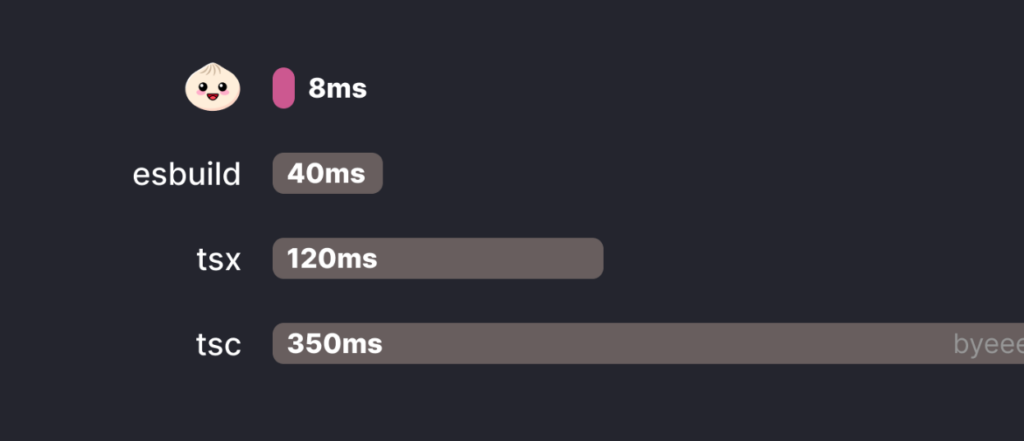
With the growing usage of serverless computing, startup speed becomes increasingly more important. Bun runs up to 4x times faster than Node.js for a simple “Hello world” script, and up to 5x faster than esbuild + Node.js when using TypeScript, since Bun supports it natively:
Package manager compatible with npm
The npm registry is the largest software registry in the world, with over two million packages. Bun taps into this registry by providing its own npm-compatible package manager, which, of course, is blazingly fast: up to 29x faster than npm. Bun achieves this by using a global module cache and the fastest system calls available on each operating system.
Here we can see how it outperforms other package managers when installing dependencies for a starter Remix project from cache:
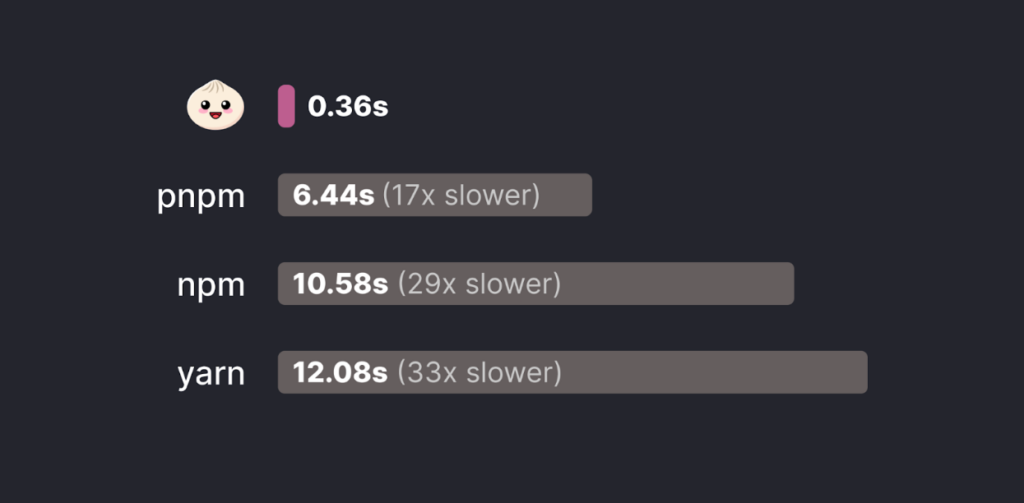
The Bun package manager can be used independently of its runtime, so you can continue using Node.js runtime while using Bun package manager.
Full ECMAScript Modules and CommonJS compatibility
When Node.js appeared, there was no standard module system. CommonJS was typically used to organize code into different modules. By 2015, ECMAScript introduced ESM, the official module system with powerful features.
The transition from CommonJS to ESM has been slow and complex for Node.js. There’s some configuration involved and a lot of packages still do not support it. Bun, on the other hand, supports both module systems without any configuration and even allows both to be used in the same file.
Baked-in bundler
Before shipping our code, it usually goes through a bundler to optimize it to its execution environment. In Node.js, this is done with third-party tools such as Webpack, esbuild, or Parcel. Bun comes with its own bundler in the form of a plugin API (heavily inspired by esbuild).
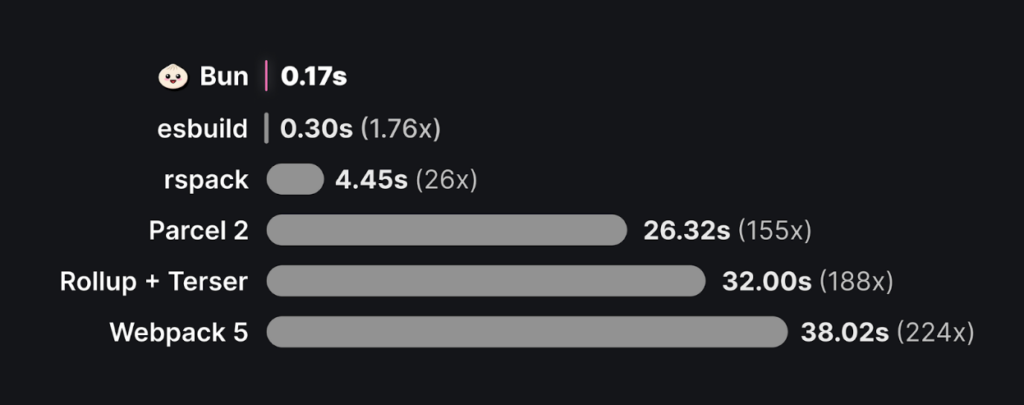
Not only that, but Bun is much faster as well: up to 224 times faster than Webpack and 1.76 times faster than esbuild.
Bun also introduces a new paradigm for JavaScript called macros, or code that is executed exclusively during bundling. The output is inlined into the resulting file:
1// release.ts2export async function getRelease(): Promise<string> {3 const response = await fetch(4 "<https://api.github.com/repos/oven-sh/bun/releases/latest>"5 );6 const { tag_name } = await response.json();7 return tag_name;8}910// index.ts11const release = await getRelease();12
Would result into:
1$ bun build index.ts2// index.ts3var release = await "bun-v1.0.0";4
A test runner compatible with Jest
We’ve seen that one of the hallmarks of Bun is its compatibility with Node.js APIs. Along with that, it also provides full compatibility with Jest through its bun:test module.
1import { test, expect } from "bun:test";23test("2 + 2", () => {4 expect(2 + 2).toBe(4);5});6
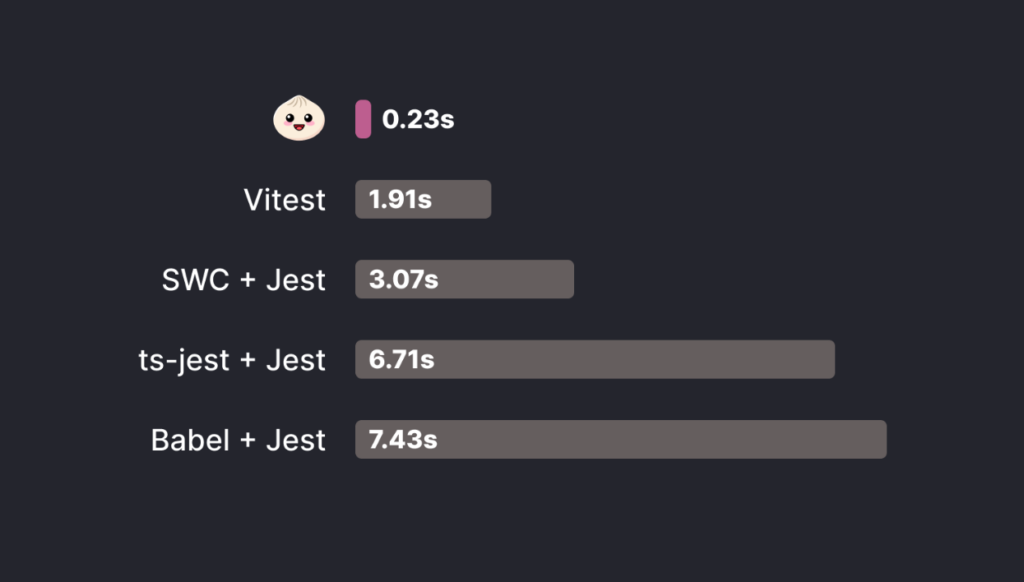
When running the test suite of Zod, Bun was 13x faster than Jest.
Web standard APIs
JavaScript comes from the web and many standards for common APIs have already been discussed and defined by standard bodies, including notable developers from major tech companies. When possible, Bun implements these APIs instead of introducing new ones.
This means:
- More code reusability
- You no longer have to install packages such as node-fetch and ws, and
- It allows Bun to be executed as an edge runtime
This makes Bun a great fit for edge functions.
Fast and easy-to-use standard library
Apart from the Node.js APIs that exist to support Node.js projects, Bun comes with its own set of APIs that are designed to be fast and easy to use.
For example, reading a file (can be up to 10x faster than Node.js):
1const file = Bun.file("package.json");2const contents = await file.text();3
Creating an HTTP server:
1Bun.serve({2 port: 3000,3 fetch(request) {4 return new Response("Hello from Bun!");5 },6});7
Or for WebSockets:
1Bun.serve({2 fetch() { ... },3 websocket: {4 open(ws) { ... },5 message(ws, data) { ... },6 close(ws, code, reason) { ... },7 },8});9
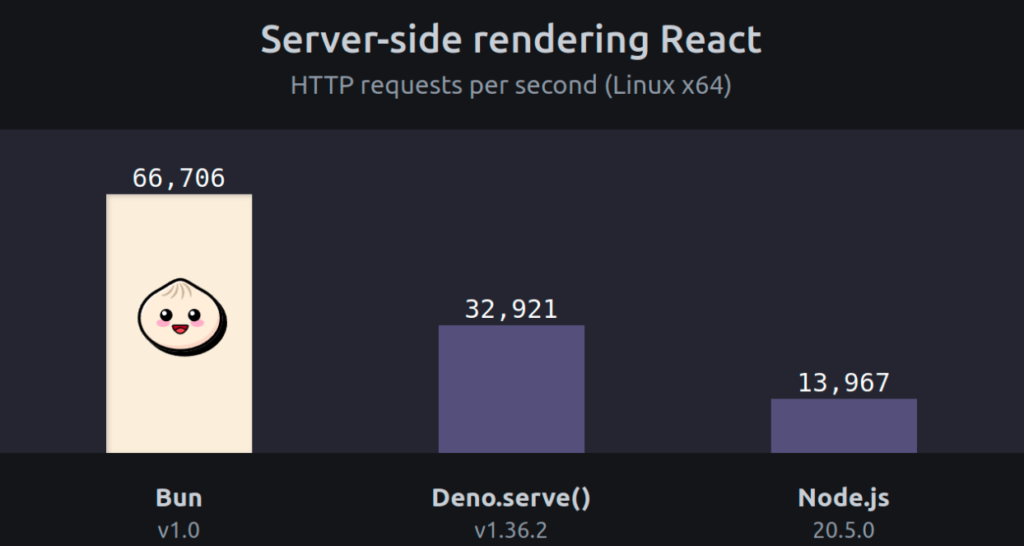
Benchmarking the performance of the web server, we see that it can handle 4x more requests/second than Node.js:
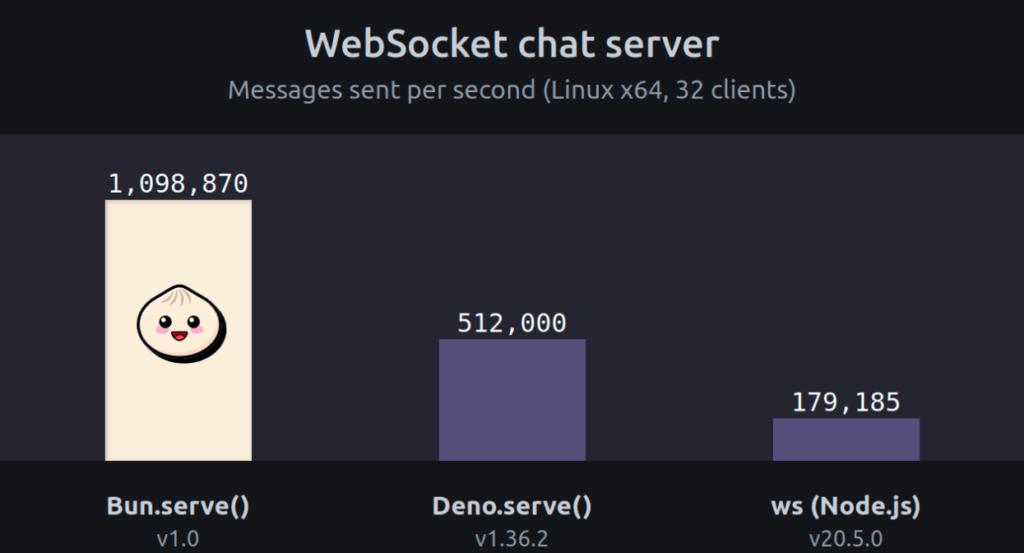
And 6x more messages/second when using WebSockets:
Bun implements many other APIs, such as a native SQLite driver, environment variables with .env, and password hashing.
Considerations Before Getting Started with Bun
At this point, you might think Bun.js is looking very promising. Like anything, of course, Bun does have its downsides. Below are some reasons software developers may decide not to use it.
Bun as a VC-funded Company
Node.js is governed by the nonprofit OpenJS Foundation and is developed by the open-source community. Bun, on the other hand, was developed by Oven.sh, a VC-backed startup. While it’s currently free, it remains to be seen what their business model will become. Startups tend to have a high failure rate and we should consider what happens if Bun fails.
Despite that, Bun is licensed with MIT, which is one of the most permissive licenses out there. So this should give us some confidence that the project will keep going, even if the business doesn’t.
Contributor Share Dominated by Bun founder
Concentrating codebase knowledge in a single individual poses a potential risk should that person become unavailable for any reason. If we take a look at the GitHub contributors page for the repository, we see that it’s predominated by Jarred Sumner, with his commits amounting to about 74% of the total. For comparison, the top contributor on Node.js has a share of 7.7%. Apart from that, Zig, the language Bun is built on, is not very well known. It’s hard to say if contribution is growing right now, and more people may learn Zig because of Bun – though it remains to be seen if this will happen.
Drop-in replacement seamlessness
How well does Bun actually work as a “drop-in replacement” for large projects with lots of dependencies and complex build pipelines? Unfortunately, we don’t have a good answer for this right now, but time will tell as we see more reports of people adopting Bun.
Community and Documentation
Node.js is a well-established player with a very large community and extensive documentation. The chances of you bumping into a problem no one has ever had before are slim. Bun, on the other hand, is a fairly new project with few people using it in production, so it has a smaller community and its documentation is not as extensive at the present moment. This will make it more likely to encounter challenges that no one has yet addressed and documented.
Final Thoughts: Is Bun right for you?
It’s critical to consider all of the factors before making a decision and adopting Bun for a medium or large project at this moment has some risks involved. You’d be discarding a proven and stable runtime that’s supported by virtually all cloud providers and has a huge community. Despite this, Bun has the potential to have a great positive impact on the ecosystem, thanks to its several disruptive features and its capacity to raise server-side JavaScript performance to a new level. And if you have a project that suffers from overly complex configuration and slow build times, then you might benefit greatly from making a switch to Bun.