
An Introduction to Serverless Architecture: Benefits and Use Cases for Cloud Applications

Cloud computing has transformed the way we host applications by offering scalable, on-demand services. Serverless architecture, as part of this evolution, allows developers to run code without managing servers.
Table Of Contents
- Back to the Basics: The History of Server Infrastructure Before Cloud Computing
- What Does “Serverless Architecture” Mean?
- What Are the Serverless Providers Available As of Today?
- Docker for Serverless Applications
- Limitations of Serverless
- Challenges When Running Certain Frameworks in Serverless
- Serverless Options for Database and Caching
- Risks and Hidden Costs of a Serverless Architecture
- Cost Comparison: When to Use Serverless VS Servermore
- Optimizing Resources in a Serverless Environment
- Common Questions When Considering Serverless
- Beyond Web Applications: What Else Can You Run in a Serverless Environment?
- Final Thoughts
- About the Author: Vin Souza
In this guide, we’ll explore the benefits and use cases of serverless, and help you determine when it’s the right choice for your application. We’ll also dive into the history of cloud computing, options from major cloud providers and smaller alternatives, as well as best practices for running applications in a serverless environment.
Back to the Basics: The History of Server Infrastructure Before Cloud Computing
Before the “big cloud” existed, we had a markedly different approach to hosting online applications.

In 1995, Geocities offered a platform to host simple websites using HTML and GIFs, providing a generous 1MB of disk space–more than enough to host your website or even a company website created with tools like Microsoft FrontPage.

Challenges of Earlier Hosting Methods
But if you were looking into hosting something more complex, like an inventory manager, an ERP, or anything of the like, you had to use other options. Many companies opted for a “bare-metal” server on-site, connected via a T1 Line or fiber optics. This setup demanded significant investment in uninterrupted power supply, which could include a generator, batteries, or other solutions. Such infrastructure was costly, making it challenging for small and medium-sized businesses (SMBs) to afford in-house hosting for their applications.
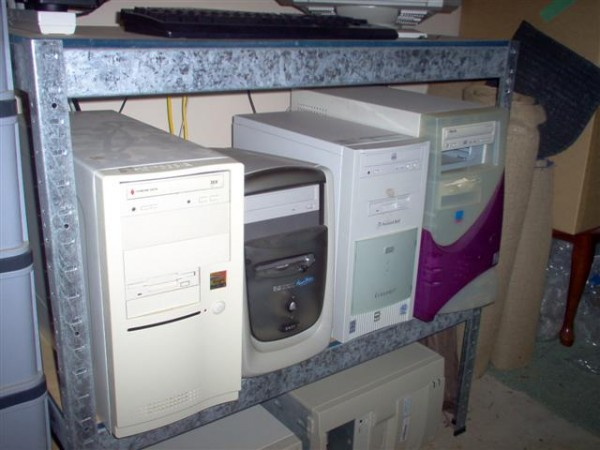
SMBs once had the option to repurpose a workstation or personal computer into servers using Linux or other UNIX-based operating systems. However, this approach had its drawbacks: the hardware wasn’t server-grade, so there was a higher risk of failure, and downtime typically meant financial losses.
The Rise of Virtualization: Enter VPS (Early 2000s)
In the early 2000s, VMware launched its Hypervisor software, giving companies the ability to partition a large enterprise-grade server into smaller chunks and resell them. These segments, or VPSs, could be leased out, offering SMBs a cost-effective way to host their applications without the overhead of maintaining their servers.
At this point, you might be asking, “So…is VPS a cloud?” The answer is both yes and no. While a VPS involves essential cloud elements–compute, network, and storage–it is still tied to a specific server. This means that, if the physical server fails, your virtual machine will also go down.
By the late 2000s, some companies started evolving this technology, clustering their Hypervisors together. This setup allowed for a “big virtual machine” that could shift a customer’s VPS to another server in the event of a physical machine failure, enhancing reliability and uptime.
The Evolution of Cloud Technology (Late 2000s)
That’s when, in 2006, AWS launched their Cloud Server option, EC2 (Elastic Compute Cloud). Because they had to respond to spikes in user traffic, Amazon had a lot of physical servers to host their website. But their servers were idle most of the time – meaning their servers had spare capacity. So, they started reselling these spare capacity to other clients. In 2008, Amazon added support to EBS (Elastic Block Storage), a service that allowed customers to attach raw storage volumes to their virtual servers and scale storage needs flexibly (“up to infinity”), billing by gigabyte per hour used.
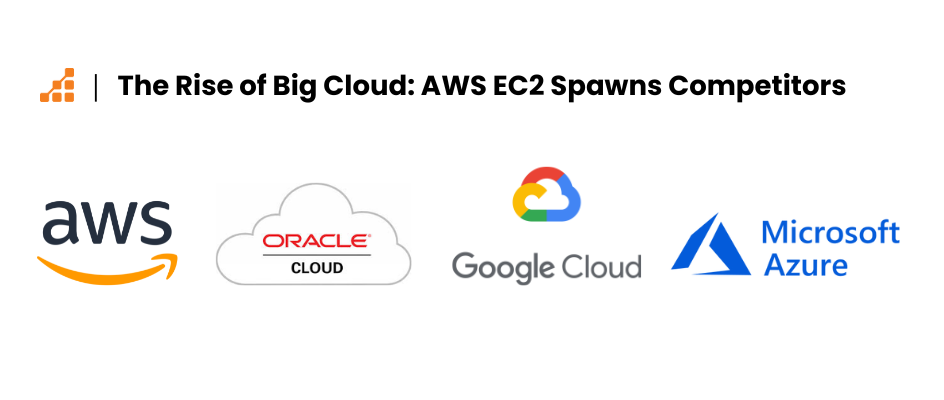
This innovation spurred a wave of competitors: Microsoft launched Azure, Google introduced Google Cloud Platform, Oracle launched Oracle Cloud, and the list goes on.
What Does “Serverless Architecture” Mean?
So, you now understand that Cloud is computing, storage, and networking and that its advantage over traditional VPS is scalability and not being confined to a single physical server, making your server virtually faultless.
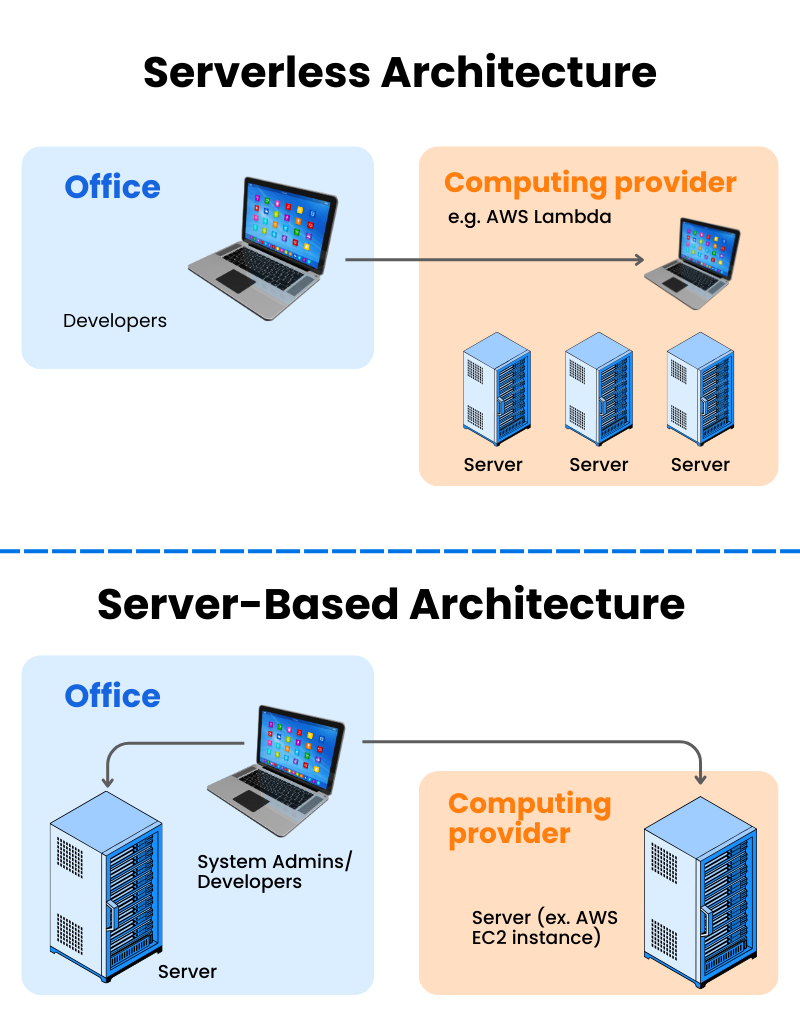
Serverless computing represents a paradigm where back-end services are fully managed by cloud providers, allowing developers to focus on their code without getting bogged down in managing servers.
In this model, companies pay only for the exact amount of resources they use, eliminating the need for fixed server costs or bandwidth allocation. This efficiency is achieved through an auto-scaling feature that adjusts resources based on demand. While the term ‘serverless’ implies no servers are involved, it’s a bit of a misnomer: physical servers are still employed by providers, they’re just not directly managed by developers.
What Are the Serverless Providers Available As of Today?
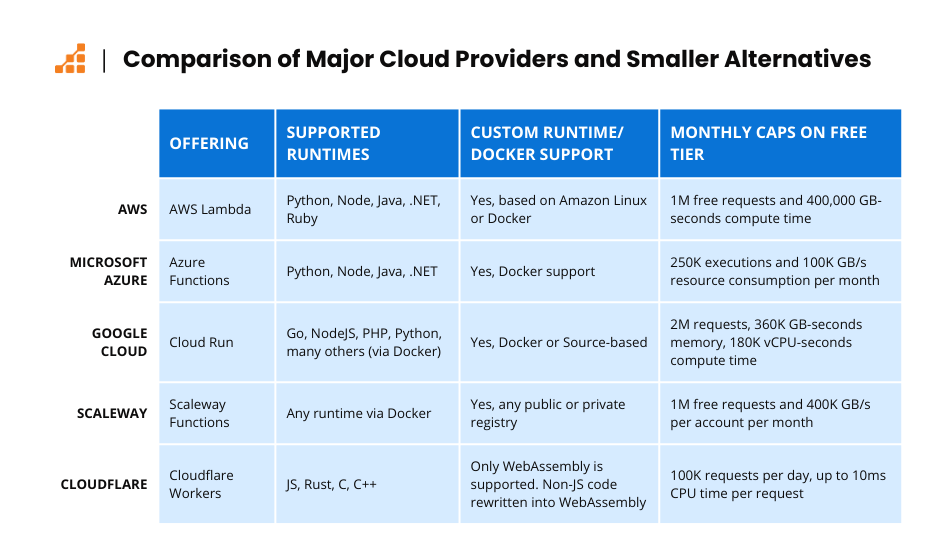
Every major cloud provider has its serverless offerings. Let’s explore some of the major ones AWS, Azure, and Google Cloud, as well as a few smaller providers.
AWS
AWS has a service called AWS Lambda, which supports various runtimes such as Python, Node, Java, .NET, and Ruby. You also have the flexibility to customize your runtime based on Amazon Linux, or build a Docker image and send it to their registry. Once uploaded, you can then create a Lambda function to run this Docker image.
AWS offers a generous forever-free tier with AWS Lambda, one million free requests per month, and 400,000 GB/seconds of compute time per month.
Microsoft Azure
Azure has a service called Azure Functions, which supports various runtimes such as Python, Node, Java, and .NET. Similar to AWS, you can also build a Docker image and send it to their registry, then create an Azure Functions in Container to run this Docker image.
Azure offers a free tier with Azure Functions, a monthly free grant of 250,000 executions, and 100,000 GB/s of resource consumption per month per subscription in pay-as-you-go on-demand.
Google Cloud
Google has a service called Cloud Run, in which you build a Docker image and send it to their registry. They also offer the possibility to use “source-based deployments” with pre-built Dockerfiles for many languages, including Go, NodeJS, PHP, and Python.
Google offers a free tier with Cloud Run, 2 million requests per month, 360,000 GB-seconds of memory, 180,000 vCPU-seconds of compute time, and 1 GB of outbound data transfer from North America per month
Smaller Cloud Providers
You may not want to go with one of the large providers. If that’s the case, some smaller providers have serverless offerings. Let’s look at a couple: Scaleway and Cloudflare.
Scaleway
Scaleway is a French provider that was created in 2006. They have their offering of Serverless functions and containers based on the open-source KNative.
With Scaleway, you can deploy a Docker image to any registry, be it public or private, and run it in their platform within cron or HTTP event handlers.
They offer a free tier with 1M free requests and 400,000 GB/s per account per month.
Cloudflare
Cloudflare started as a CDN provider within its caching offering but has grown to provide a lot of other services, including Cloudflare Workers. Workers run on a distributed scale, running at the Edge of Cloudflare’s global data centers.
You can deploy JS, Rust, C, and C++ code to it, it will rewrite anything other than JS to WebAssembly, as they use a somewhat V8-based runtime.
They offer a free tier with 100,000 requests per day and up to 10ms CPU time per request.
Docker for Serverless Applications
You might have noticed that some of the providers allow you to build Docker images and push them to their serverless offerings. So you may be wondering: “Why should I run my Docker images in a serverless environment?”
As you likely know, Docker is a container engine that allows you to pack all the software your application and/or dev environment needs to run with the help of a Dockerfile, a declarative syntax file where you can add files, run commands, and much more.
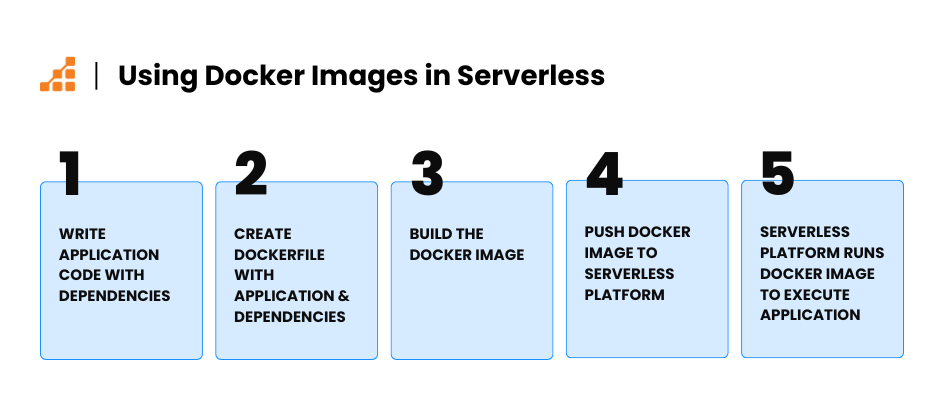
By supporting Docker in their serverless offerings, providers allow you to build your package with the libraries you need and the supporting software you need to make your application run without the constraints of the provider’s runtime.
This is easier to explain with examples.
Scenario 1: Running Go in Scaleway Functions
Let’s say you want to run your Go application in Scaleway Functions. At the time of this writing, Scaleway itself doesn’t have a Go runtime. But it does provide a service called “Scaleway Containers,” which allows you to run your Go application in a containerized environment.
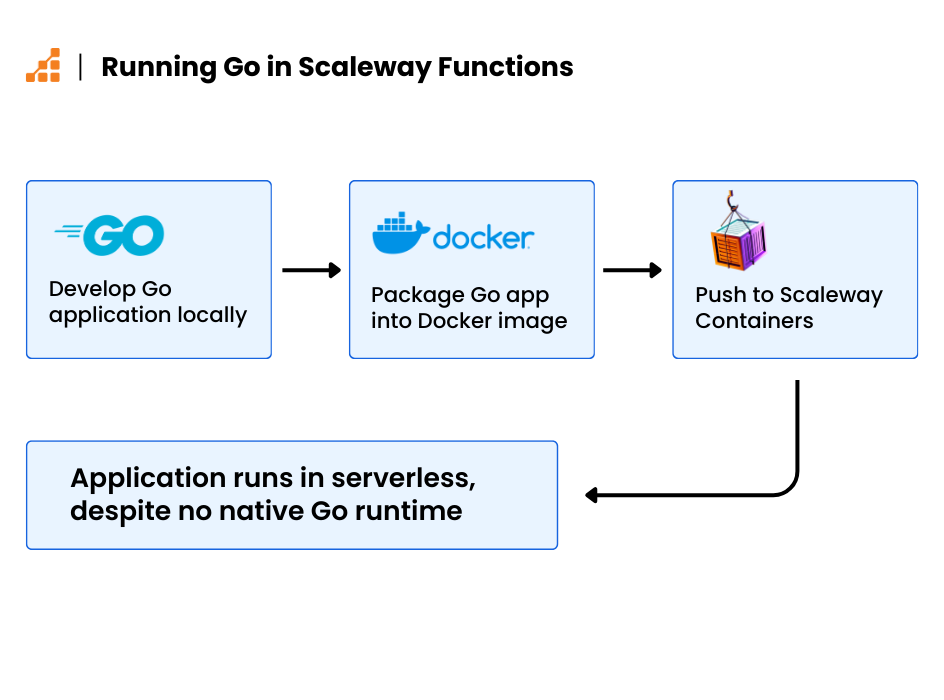
This means you can use Docker to build your Go application inside a container that runs an HTTP server to interface with your Go code. By deploying it to a ‘Scaleway Container Function,’ Scaleway can interact with your Go application, even though it doesn’t natively support Go in its runtimes.
Scenario 2: Deprecated Runtime Versions
Imagine you need to run a deprecated runtime version, like Node 14. But your provider (say, AWS Lambda) only supports Node 18.
In this case, it appears your only options are to:
- Switch providers
- Upgrade your application to Node 18
If your application has legacy code that relies on legacy libraries that weren’t upgraded to the latest NodeJS versions, then neither of these are good options. But there is a third way forward: build a Dockerfile that packs your application with Node 14 in a Docker image and push it to Lambda. This allows you to continue using your legacy code in a serverless environment.
Performance Considerations: Docker and Virtualization in Serverless
You might wonder if running Docker in a serverless environment will slow things down. While there’s some virtualization involved, most providers already use Docker-like container technology behind the scenes (not exactly Docker, but typically a ContainerD derivative). AWS has even taken it a step further by developing its lightweight virtualization tool called Firecracker, a light hypervisor specifically designed to optimize the performance of Lamba functions.
So, overall, there’s not a significant performance hit when using docker containers in a serverless environment.
Why Run Docker Containers in Serverless vs on Virtual Machines (VMs)?
You could argue that running your Docker containers on a virtual machine is an option.
While this is technically true, there are advantages to running serverless here instead.
Going serverless means that you don’t have to manage servers, deal with scaling issues, or risk downtime during traffic spikes. As such, serverless environments scale more efficiently and automatically handle infrastructure concerns without manual intervention.
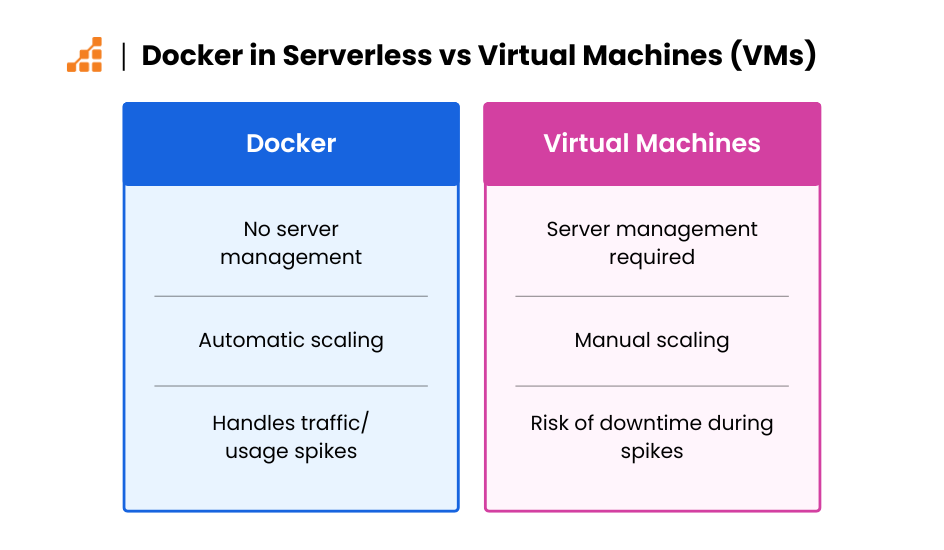
Yes, you can run your code on virtual machines, but it’s important to remember why you’re considering serverless in the first place.
For example:
- You might not want to manage servers due to limited personnel
- You might experience sudden traffic surges that even auto-scaling can’t handle quickly enough.
With virtual machines, the provider has to detect the spike, trigger an alarm, launch a new instance, wait for it to be ready, and only then will your load balancer start routing traffic to it.
During this time, users could still experience ‘Failed to load’ errors or ‘Website is down’ messages, potentially driving them to look elsewhere. On the flip side, for startups with minimal traffic, it’s not efficient to keep a machine running 24/7. Even with auto-scaling, you’d still need at least one instance up at all times, which might be overkill for serving a handful of users.
Limitations of Serverless
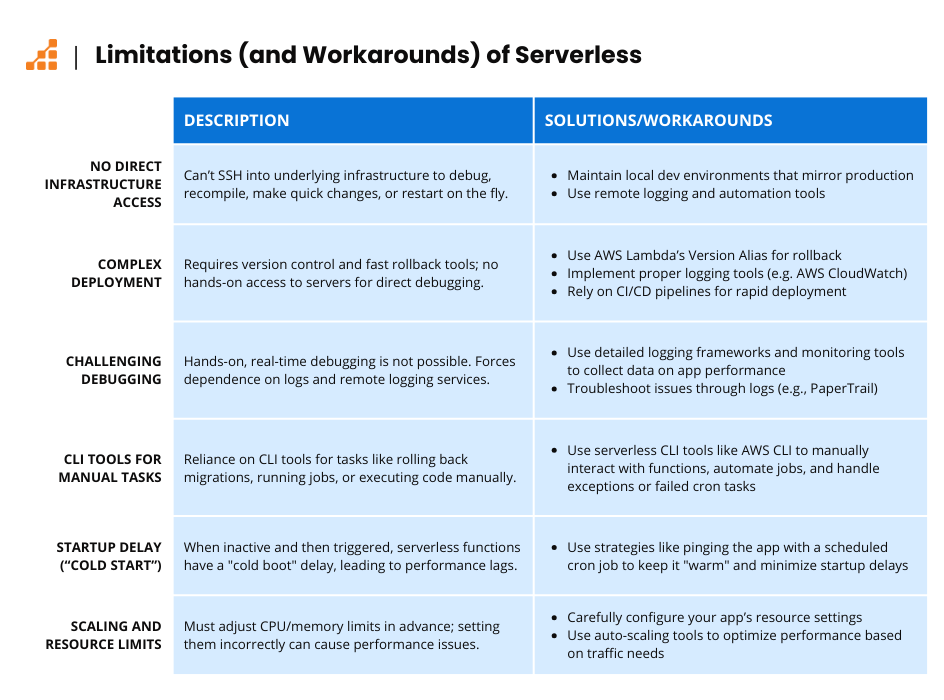
In my opinion, most of the “limitations” of serverless aren’t so much drawbacks as they are a shift in mindset. Below are the key areas where the move to serverless requires a change in how you approach traditional development tasks.
Infrastructure and Deployment Limitations in Serverless Environments
First, in a serverless environment, you don’t have access to the underlying infrastructure where your application is running. This means you can’t SSH into a virtual machine to debug issues, make quick code changes, recompile, or restart the app on the fly like you could with traditional servers. Serverless environments abstract away this control, requiring a shift in how you approach development and debugging.
Since you don’t have direct access to the infrastructure, serverless emphasizes creating a local development environment that closely mirrors production. To me, that means you must move away from the “old way” of thinking, in which you control the machine running your code.
Rapid deployment through version control becomes essential, and understanding how to quickly revert changes is equally critical. tools like AWS Lambda’s Version Alias let you roll back to a previous version by simply updating the alias pointer, ensuring minimal disruption when errors occur.
In a traditional server-based architecture, you have direct access to the underlying infrastructure, which allows you to SSH into the server, inspect logs in real time, and perform immediate debugging directly on the machine. This means you can modify configurations, check system states, and troubleshoot issues as they occur.
In contrast, in a serverless environment, you don’t have direct access to the servers running your application. Instead, you rely on built-in logging services offered by the cloud provider (like AWS CloudWatch Logs) or third-party tools like PaperTrail or Datadog.
These services aggregate logs from your application, but you must adapt to not having real-time access to the machine itself. This requires more reliance on logs for debugging and troubleshooting, making proper logging practices even more essential compared to traditional server-based setups where hands-on interaction is possible.
CLI Tools and Automation
Some serverless frameworks allow you to run your code from a CLI (Command Line Interface). This lets you execute code, roll back a migration that went wrong, or maybe call some calculator script that was supposed to be called from a cronjob that failed. This helps fill in the gaps left by the lack of direct infrastructure access.
In the end, you need to start thinking differently about how you handle your infrastructure when you decide to switch to serverless, comprehend its “limitations” and use the tools available to “work around” them.
Performance
Serverless does come with a startup penalty, as the provider decides when to stop your inactive application if a new request comes it does need some time to load libraries, and application code again to start processing the request, we call that “cold boot”, in the past this was a major issue, but today most of the providers improved their systems to minimize the cold boot time down to as low as 100ms, and some providers also allow you to use “tricks” to their systems so your application is always warm, for example, in AWS Lambda you can use a “cron job” to ping your application every 5 minutes which will, in turn, make your application always ready to the next request, this, of course, will be billed as a request every 5 minutes, but if you configure your code to exit as soon as it detects it’s a “ping”, your bill won’t be hugely impacted, as little to no resources will be consumed.
As for performance, again, when you consider that most of the providers use the same virtualization under the hood that your typical Virtual Machine uses, you won’t see a difference in performance as long as you set your CPU and memory limits correctly.
Challenges When Running Certain Frameworks in Serverless
PHP
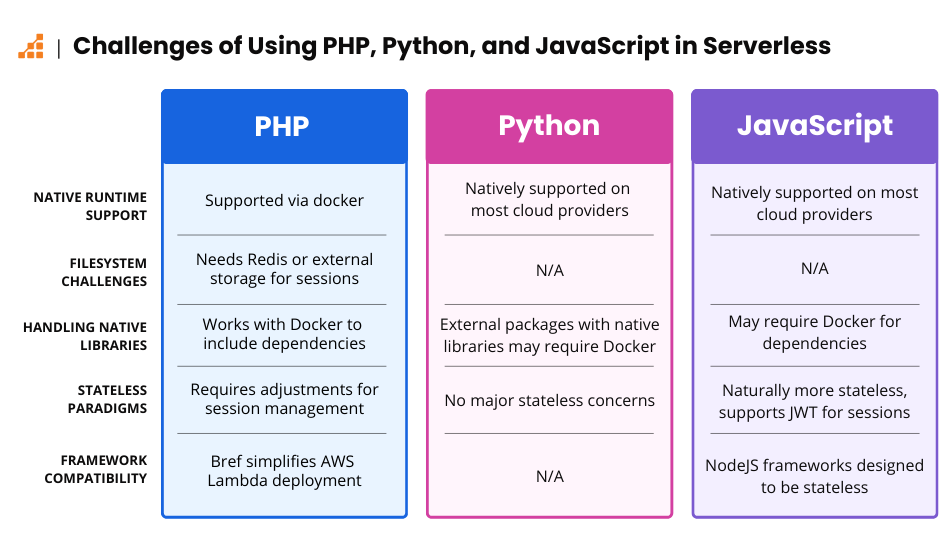
PHP has been able to run in serverless environments for quite some time, starting with Azure’s App Service. Today, most major providers support Docker, allowing you to run your PHP application on virtually any serverless platform.
However, serverless environments still use an ephemeral filesystem, which means certain PHP settings need to be adjusted. For example, you can’t rely on the file handler for session storage, as the session file may not be available in subsequent executions. Instead, you’ll need to use a distributed file system or a caching engine, such as Redis, to store session data.
Additionally, some frameworks can benefit from a project called Bref, which simplifies the process of running PHP applications on AWS Lambda by handling much of the underlying setup.
Python
Python applications have native runtimes in most major cloud providers, making it relatively easy to deploy them to serverless environments. However, things can get more complicated when you need to install external packages, especially those that rely on native libraries. Some of these libraries might not be available in the cloud provider’s runtime.
Fortunately, Docker can simplify this process. You can create a Dockerfile to package your entire application, including all necessary libraries and modules, into a single Docker image and deploy it to your cloud provider.
JavaScript (NodeJS)
Like Python, JavaScript (Node.js) has native runtimes supported by most major cloud providers. While it’s often said that JavaScript is easier to run in serverless environments, that’s not entirely true. JavaScript also has dependencies that rely on native libraries, which may not be installed in the cloud provider’s runtime. As with Python, you can package your entire application in a Docker image to overcome this limitation.
Since JavaScript’s server-side usage (via Node.js) began in 2009, many stateless paradigms were already well-established. As a result, Node.js frameworks tend to avoid reliance on local filesystem access, often storing session data client-side using JSON Web Tokens (JWT) and adopting other stateless practices.
Serverless Options for Database and Caching
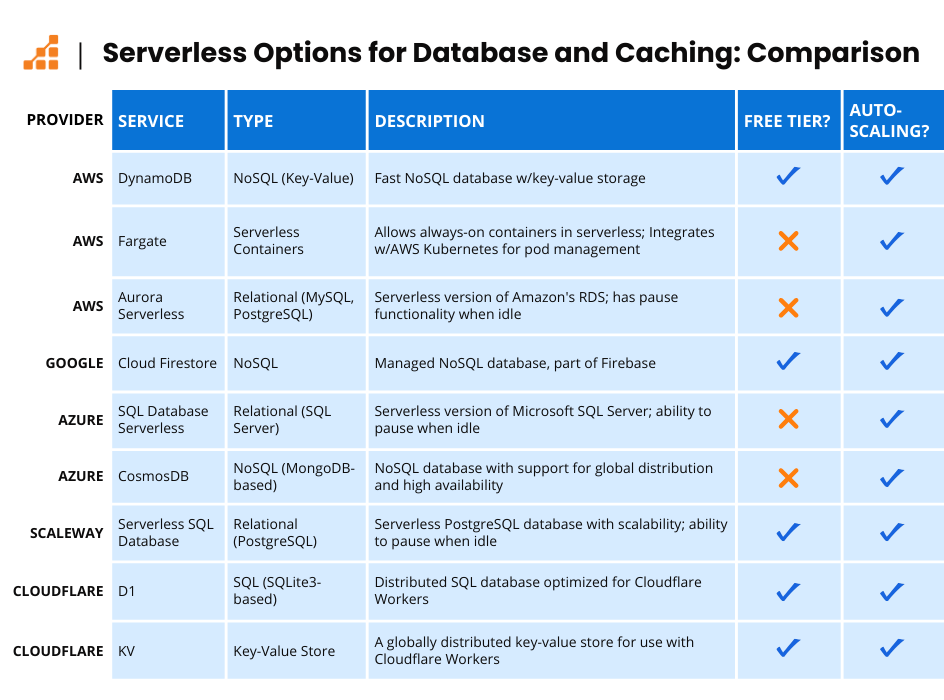
The major cloud providers all offer some serverless options for database and caching. Below is an overview of some of the primary options.
AWS Provided
- AWS DynamoDB: DynamoDB is a fast NoSQL key-value database. You can use on-demand pricing or opt for provisioned capacity mode, where you pay a monthly fee for reserved capacity and use auto-scaling to handle increased read-write operations per second.
- AWS Fargate: Fargate allows you to run always-on containers in a serverless environment. You simply define your CPU and memory needs, and it will launch the container in AWS’s orchestrator. It can also be used with AWS Kubernetes Service, allowing you to run your pods in a serverless environment.
- AWS Aurora Serverless: This is Amazon’s Relational Database Service (RDS) running in a serverless environment. With Aurora Serverless, you can use AWS’s Aurora Engine in both MySQL and PostgreSQL versions with infinite capacity, and it allows you to pause your database when there are no requests.
Google Provided
- Cloud Firestore: Part of the Firebase offering from Google Cloud, Cloud Firestore is a NoSQL database that automatically scales, managed entirely by Google.
Azure Provided
- Azure SQL Database Serverless: Azure offers a serverless version of Microsoft SQL Server, similar to AWS Aurora. You can configure it to pause when there are no requests.
- Azure CosmosDB: A NoSQL (MongoDB-based) database from Azure, similar to DynamoDB. It offers on-demand pricing and the option to reserve capacity with a monthly fee.
Scaleway Provided
- Serverless SQL Database: Scaleway offers a PostgreSQL database with the ability to pause when there are no requests and scale indefinitely.
Cloudflare Provided
- Cloudflare D1: Based on SQLite3, D1 allows you to run a globally distributed database for your serverless functions (Workers). You pay per row read and write, and also per storage. They offer a free tier with this service.
- Cloudflare KV: Cloudflare’s key-value store offering for Workers. You pay per request, with a free tier available.
Risks and Hidden Costs of a Serverless Architecture
Serverless provides us with amazing capabilities. We can scale our application indefinitely and don’t need to worry about the underlying infrastructure. But, without attention, it can also (in the most extreme circumstances), bankrupt your business.
Distributed Denial of Service (DDOS)
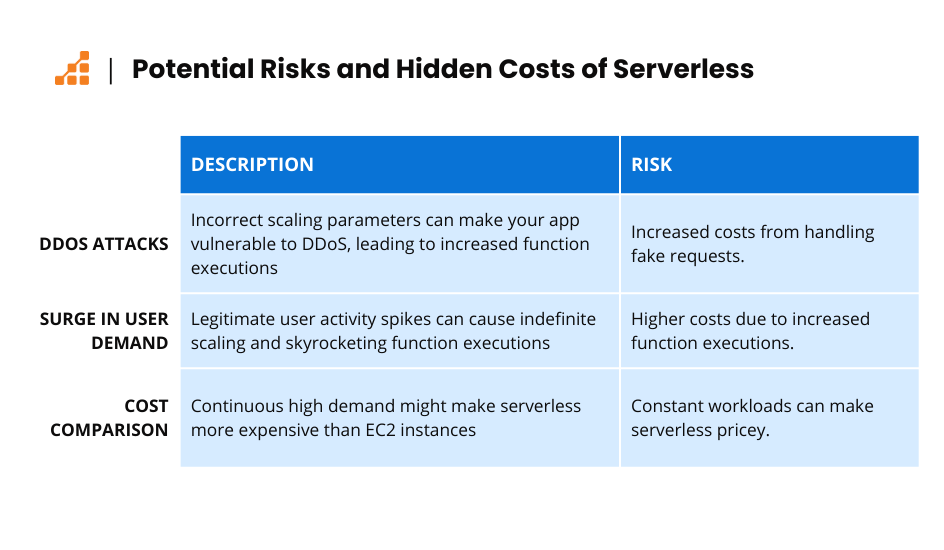
The ability to scale indefinitely is a major advantage of serverless. But if you don’t correctly set your scaling parameters, your application could become vulnerable to a Distributed Denial of Service DDOS attempt. Such attacks flood your application with fake requests, prompting it to launch more and more functions to handle the increased load. This unintended scaling can significantly drive up your costs as you pay for additional resources to manage these spurious requests.
Surge in User Demands
DDOS attacks aren’t the only thing that can make your functions scale indefinitely. Your application can start receiving a lot of legitimate user actions. For example, the video streaming company I mentioned may experience a surge in user activity, where more users are uploading videos for conversion. This increase in demand can cause the number of video conversions – and thus the serverless function executions – to skyrocket. That’s when you need to start thinking about “moving toward serverless” and “going back to server more.”
To illustrate, let’s use AWS as an example. Suppose we’re comparing the cost of running serverless functions against an EC2 instance, such as the M4.large. If you have your lambda function set to have 1GB of memory, and each request takes 200ms to complete, you just need to handle 9.4 requests per second consistently to hit the M4.large month cost.
So when you think about this streaming company that keeps their lambdas running all day long, it would be significantly cheaper for them to keep an EC2 instance handling these jobs all day long.
Cost Comparison: When to Use Serverless VS Servermore
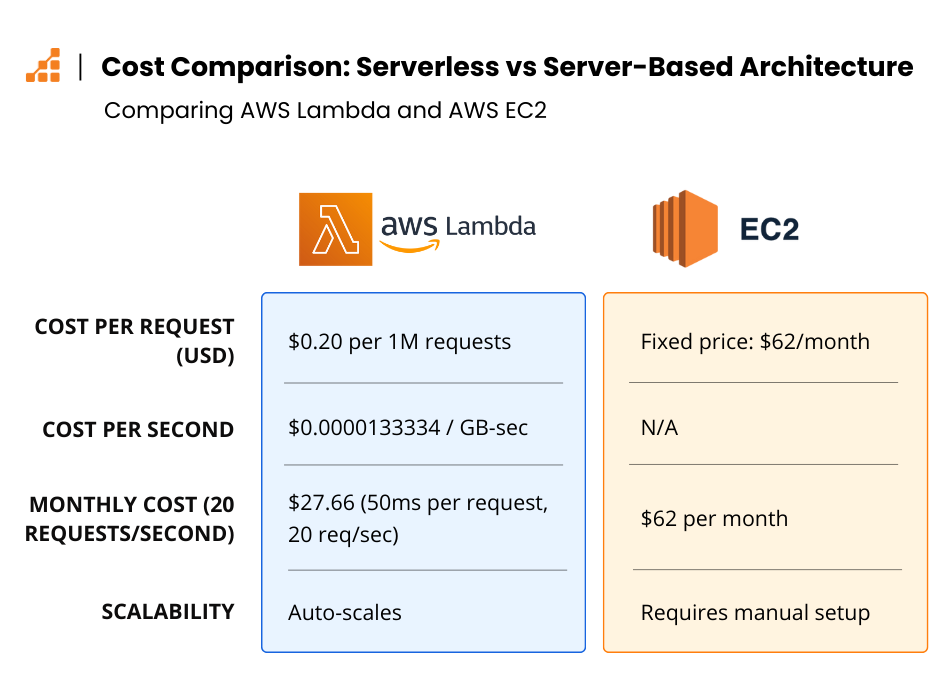
Thinking about costs is most easily illustrated with an example. So, let’s consider AWS Lamba vs AWS EC2 to shed light on when to use serverless vs servermore. For simplicity, let’s say you do not have the free-tier credits with AWS Lambda.
AWS Lambda Pricing (Ohio Region, USD)
As of the time of this writing, AWS Lambda pricing is as follows:
- X64 Lambdas: $0.0000166667 per GB-second
- ARM Lambdas: $0.0000133334 per GB-second
- Requests: $0.20 per 1M requests
Now, let’s consider that you currently have an m5a.large instance from AWS, which has 2 Virtual CPUs and 8 GB of RAM. If we keep the region the same, the on-demand costs are roughly $62/month, and your application handles 20 requests per second with this instance.
Example: AWS Lambda Cost Calculation
If we head to calculator.aws and select Ohio and AWS Lambda, we can select X86 as our Lambda Architecture and a total of 20 requests per second.
Let’s start with some conservative numbers:
- Request duration: Each request takes 50 milliseconds to complete (this might be very optimistic, depending on your application)
- Memory allocation: Allocate 400 megabytes per request (8 Gigabytes divided by 20 requests/second would be ~400 megabytes/second/request),
- Ephemeral storage: Let’s also set 1024 megabytes of ephemeral storage, because your application needs to download big files
With these estimates, AWS calculates this setup cost to be $27.66 per month – a significant saving compared to $62 per month, right?
When Serverless Costs Can Escalate
But, if we start modifying things, we can see how the price starts to go “out of control.” For example, let’s say your application takes 500 ms per request to complete. That brings our monthly cost to $182.01 using AWS Lambda alone!
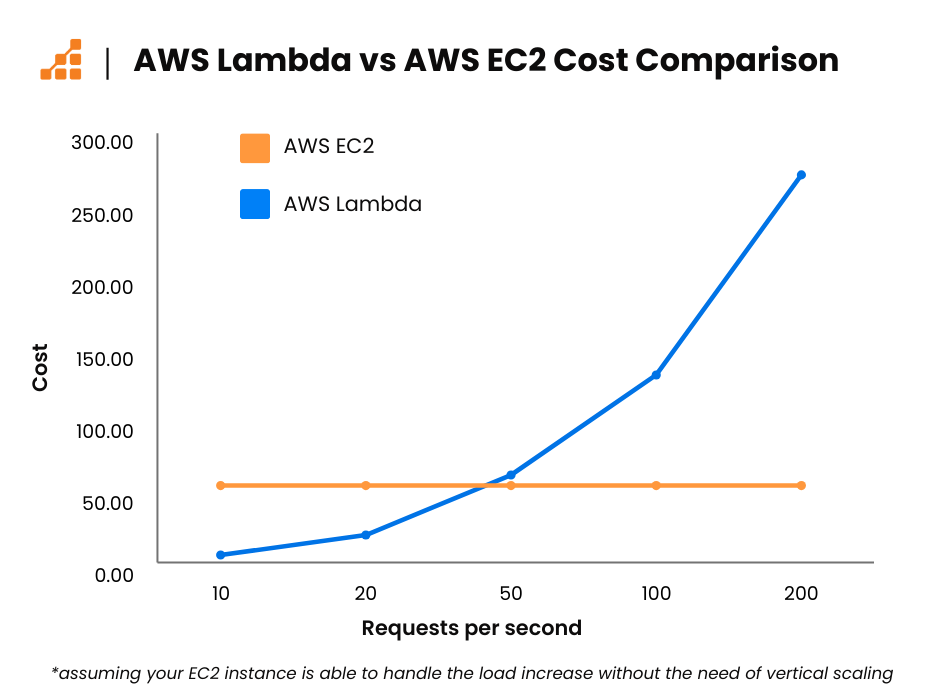
Now, you might be wondering, “Why would I use Lambda after all if the costs can get this high?” As we discussed, it all depends on your application, and more specifically, your application’s traffic patterns.
Applications with constant, sustained traffic over time are better suited to a server-based (servermore) approach, where a dedicated instance like EC2 can provide more cost-effective performance.
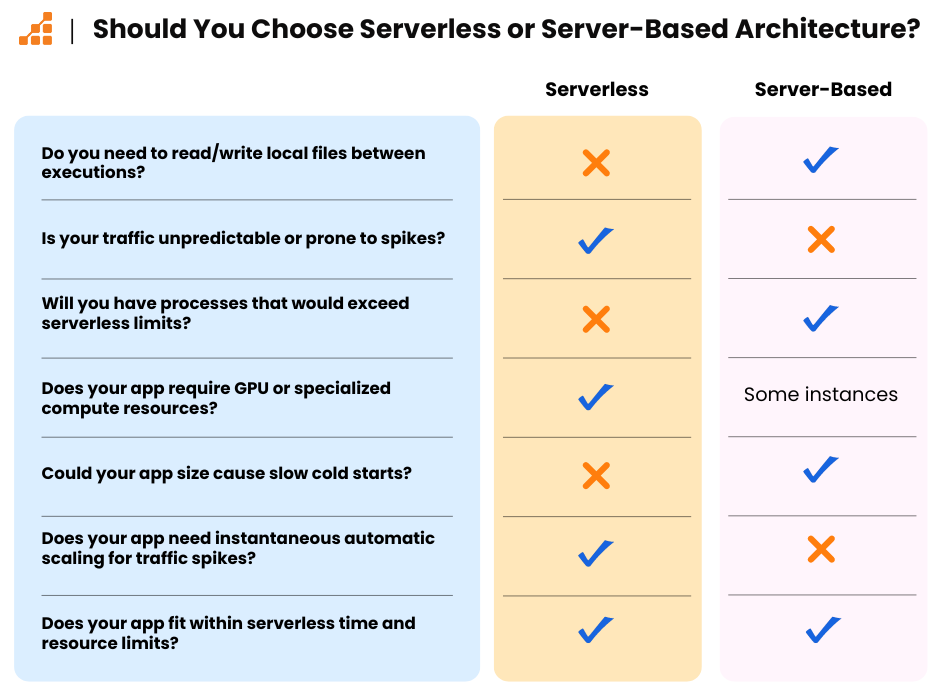
However, most applications don’t have constant or sustained loads. Instead, they experience traffic surges, followed by periods of low or no activity. In these cases, serverless shines by automatically scaling up during peak times and scaling down to zero when idle, making it far more cost-effective for handling unpredictable traffic.
Optimizing Resources in a Serverless Environment
You can optimize resource usage in a serverless environment by segmenting your application into components with varying resource demands, specifically those requiring intermittent resources. For example, imagine you have a routine that generates reports for your entire customer base and sends them daily. In a serverless setup, you can isolate this routine into a specific function triggered by a CRON job. This allows you to allocate substantial CPU and memory resources to this function only when needed, ensuring you pay solely for the resources used during that brief period.
Additionally, some AI companies use serverless functions to train their AI models without needing to establish an extensive infrastructure that becomes redundant once the model finishes training.
Similarly, video streaming companies use serverless to process streams, convert them, and store them in a distributed filesystem like AWS S3.
Common Questions When Considering Serverless
Does A Serverless Environment Require Changes to My Application?
Although physical servers still power serverless environments, the operational context is a bit different. For instance, your application typically runs in a sandbox environment, which is periodically cleaned as the serverless provider seems fit.
This setup implies that you can’t rely on local file storage between executions; there’s no guarantee that a file written during one run will persist to the next. This leads us to the concept of “stateless.”
Stateless code refers to code that operates without relying on the memory of past interactions, effectively making each run of your application a fresh start. The environment remains clean, devoid of data from previous sessions. That doesn’t mean your application can’t store anything, only means that your application relies on external services like databases or caching engines to store data.
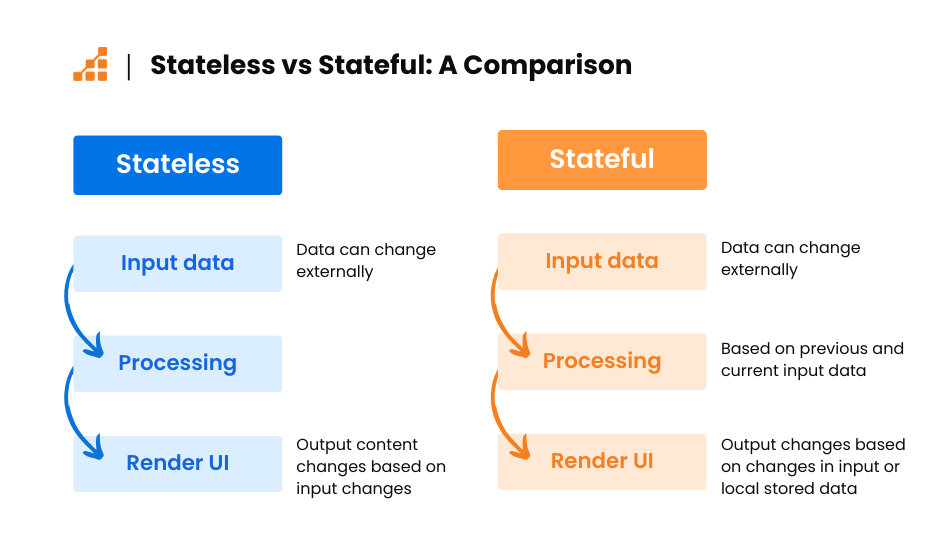
Consequently, traditional methods like the plain old PHP session handler that uses files in the “/tmp” folder, won’t work in a serverless environment: each execution will find the “/tmp” folder reset. To manage session information, you would need to integrate some external storage like some Redis caching, or even DynamoDB.
Can I run both serverless and “server more” at the same time?
Depending on your application and the kind of “load balancer” you put in front of it (either a Web load balancer or a queue load balancer), you can use a mix of both boring cloud instances like EC2 and shiny new Lambda functions. That way, you can have your EC2 instance handle the usual daily load, and fall back to a lambda function when the load is too high for it to handle.
Is it Possible to Start Serverless, Then Move to “Server More”?
It all takes early preparation, with today’s technology we have containers to help us.
The first step is to make your application stateless. Then, you need some sort of common ground to translate whatever event is triggering your application, be it some HTTP request, a Lambda invocation, or a queue invocation. That will make your application able to run anywhere you want and also help you with vendor lock-in.
When you need to switch vendors or even technologies, all you have to do is create the new translation layer from this new vendor software to your application, create a new Dockerfile with the needed software from this new vendor, and run some tests from your application with this new vendor.
The same thing happens when you need to move back to “server more”: you pack a new Dockerfile with some HTTP server or queue software, and deploy it into your fleet of servers.
How Can I Make Sure My Serverless Functions Won’t Bankrupt Me?
If you’re worried that a sudden spike in traffic or an attack might cause your serverless functions to scale endlessly and rack up a massive bill, you’re not alone. But with the right settings and alerts, you can keep things under control.
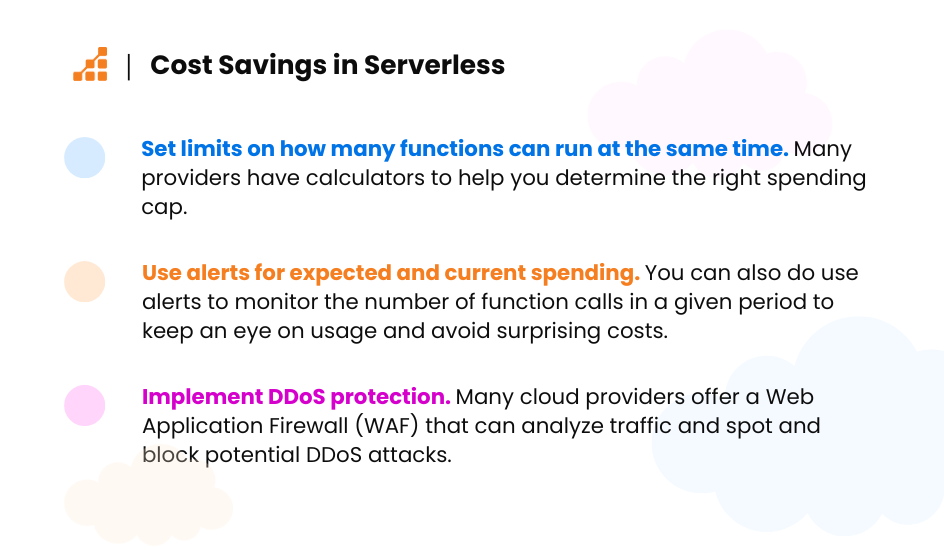
Settings: Most serverless providers let you set limits on how many functions can run at the same time. This helps you cap your spending and keep everything running smoothly. You’ll need to do some quick calculations to figure out how many concurrent executions fit within your budget. Many providers, like AWS, have handy calculators to help you out.
Alerts: You can also set up alerts based on specific metrics. For instance, AWS lets you set alerts based on your expected and current spending. You can even set alerts for the number of function calls over a certain period. With this info, you can set up alerts to keep an eye on your usage and stop any surprise costs.
DDoS Protection: Many cloud providers offer DDoS protection with a Web Application Firewall (WAF) in front of your app. These WAFs analyze traffic and can spot and block potential DDoS attacks, either by showing captchas or blocking requests altogether.
By tweaking these settings, setting up alerts, and using DDoS protection, you can use serverless functions without the worry of unexpected costs.
Are Serverless Offerings From Big Cloud Companies Right For Me?
Ok, so at this point, you may be wondering if “big cloud serverless offerings” are right for you. So, how do you know?
In my humble opinion, it all depends on your project type, project requirements, regulatory requirements, and of course, the skillset of your developers.
If you want to go with an option outside of the big cloud, Scaleway and CloudFlare are some good options. They have the needed certifications and provide the same uptime as these “Big Clouds.”
Of course, you should always do your research and see what fits best for you. Always look for their detailed pricing, and how long they have been in business. Reddit also helps with finding reviews from other customers. Make sure you don’t take the first 1-star review that says “I don’t like it” (or the 5-star that loves it) – reviews are a goldmine of real user experiences that can help you understand the actual strengths and weaknesses of a provider.
Beyond Web Applications: What Else Can You Run in a Serverless Environment?
Over the years, cloud providers started providing other services in Serverless with pay-as-you-go billing, so you could effectively have your whole infrastructure running in a serverless environment.
There are now options for integrating databases and caching solutions into a serverless environment. You can run relational databases like Postgres or MySQL, or opt for Redis for caching purposes. Additionally, DynamoDB offers a robust key-value store solution that can run in a serverless environment.
Final Thoughts
So, let’s recap, cloud computing is nothing more than computing, storage, and networking, so your cloud provider might provide more services based on these premises, like some Managed Redis solution, or even your Managed PostgreSQL Database.
Serverless then provides you with a way of not having to prepare in advance your underlying infrastructure for your application needs, as you just define the maximum resources you are willing to give to your application at a given request you have “infinite” capacity (of course you can define it within your parameters, setting a spending limit, or some sort of capacity limit) provided by the cloud provider, of course, this comes with a cost.
Suppose you monitor your application and start discovering usage trends. In that case, you can use a mix of “server more” and serverless to save costs, have a fixed infrastructure capacity to serve the “baseline” of your application, and use serverless to provide capacity at peak times.
And last but not least, not everyone needs to be using one of the big cloud providers, depending on your needs, region, capacity, and legislation (certifications also matter), you might save a lot of your hard-earned money using other “smaller” cloud providers.
About the Author: Vin Souza
I started learning about computing and networking back in 2004. I read as much as I could, taking out books from public libraries, and, as expected, breaking computers.

Over the years, I’ve worked for many companies and worn many hats, doing everything from full-stack development to systems administration. All of this led me to gain a lot of experience writing performant code and saving hard-earned dollars by being strategic about where resources were allocated.
My tech experience ranges from compiled languages like C/C++ and scripting languages like PHP, Python, and JavaScript to infrastructure as code within Terraform in AWS, Oracle, and Azure with Continuous Deployment and Integration with CircleCI and Github Actions.